Monitoring7 min read
WordPress cron monitoring: prove scheduled jobs ran
Diagnose WordPress cron not running, find overdue events, test spawning, run due jobs from system cron, and add alerts that prove key jobs finished.
 By Hamza Ahmad AslamWordPress VIP, Performance & Full-Stack Engineer
On this page
- Why WP-Cron can miss its time on quiet or cached sites
- WordPress cron not running: test the trigger first
- Find overdue and failing events with WP-CLI
- A disabled trigger without a replacement
- A fatal error inside a callback
- A long-running job that holds the cron process
- Run due events from the system scheduler correctly
- Add wp-cron monitoring that proves completion
- Prevent scheduled posts from showing “Missed schedule”
- What to do next
- Frequently asked questions
Short answer: If WordPress cron not running is delaying posts, emails, imports, or backups, first prove whether WP-Cron can spawn and whether events are already overdue. Then move the trigger to a system scheduler when timing matters, and monitor both overdue events and a success heartbeat from the jobs you care about.
Why WP-Cron can miss its time on quiet or cached sites
WP-Cron is WordPress's time-based task system. It stores scheduled events, then checks for work when WordPress receives a request. The WordPress cron handbook (opens in a new tab) is explicit that WP-Cron does not run continuously like a system cron daemon.
That design matters on low-traffic sites. If an event is due while nobody reaches WordPress, there is nothing to start it. The next request can trigger the overdue work, so a scheduled time is closer to an earliest run time than a guaranteed execution time.
Full-page caching can create the same symptom. A request served entirely by a CDN, reverse proxy, or web-server cache does not execute WordPress PHP. That cache hit cannot start WP-Cron. A site can look busy in analytics while the origin sees too few PHP requests to keep scheduled work punctual.
This distinction also explains why uptime is not enough. A cached home page can return successfully while scheduled posts, imports, or mail jobs are already late.
WordPress cron not running: test the trigger first
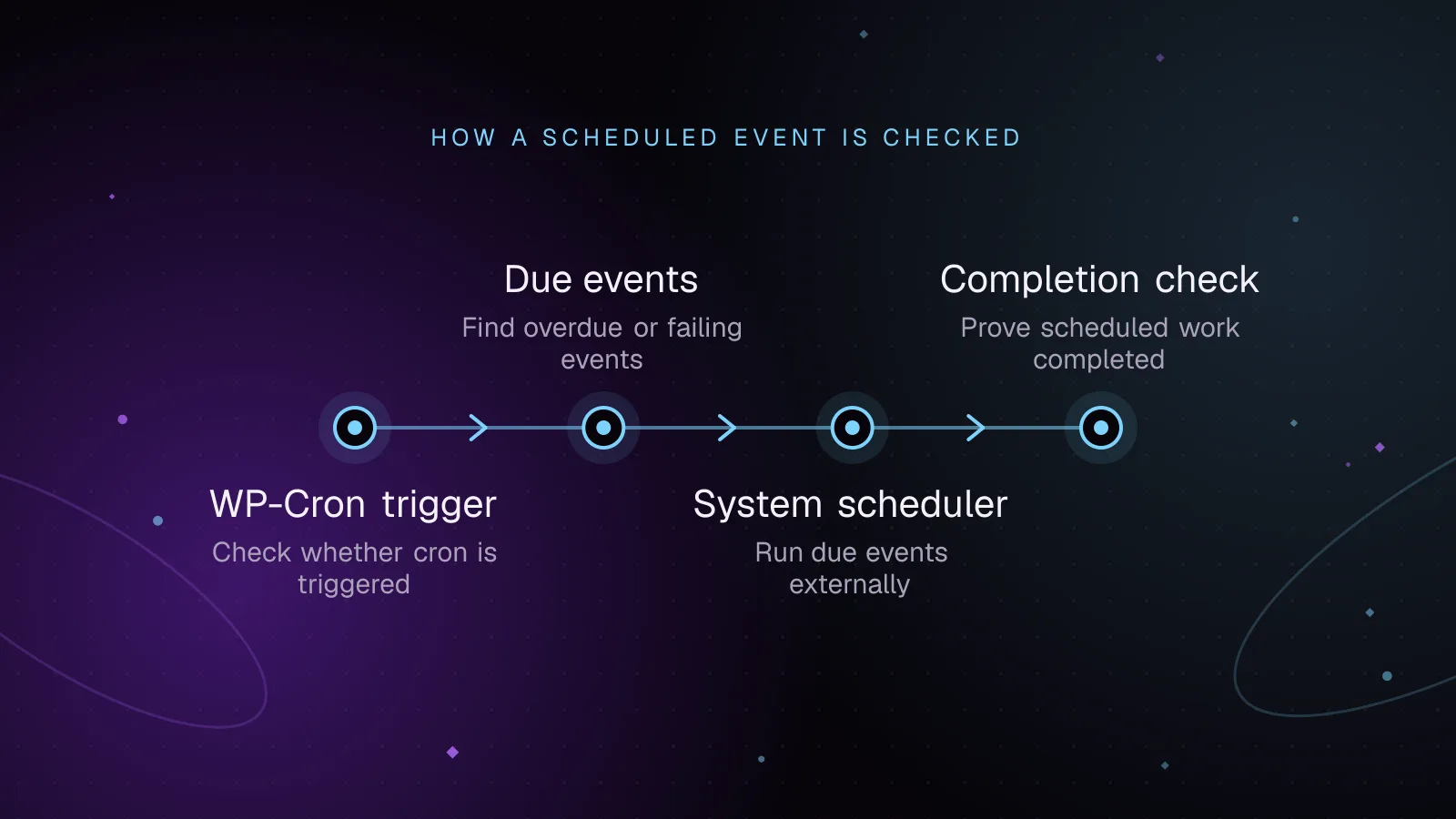
Start with the WP-CLI spawning test. It checks whether DISABLE_WP_CRON is enabled, warns about alternative cron mode, and attempts to spawn WP-Cron over HTTP. The behavior is documented for wp cron test (opens in a new tab).
wp cron test
Example output, showing the documented success response:
Success: WP-Cron spawning is working as expected.
A passing test proves the spawning path works at that moment. It does not prove every callback succeeds.
If the test reports that cron is disabled, inspect wp-config.php. DISABLE_WP_CRON is valid when another scheduler has replaced page-triggered spawning. It is a fault when the constant is enabled and no replacement exists.
Loopback failure is another common cause. Normal WP-Cron spawning makes an HTTP request back to the site. A proxy, access-control rule, HTTP authentication layer, TLS problem, or server policy that rejects that self-request can stop the spawn even while public pages load normally.
Find overdue and failing events with WP-CLI
Use wp cron event list (opens in a new tab) to inspect what WordPress thinks should run next. The default fields include the hook, next GMT run, relative run time, and recurrence. Make the fields explicit so monitoring scripts do not depend on presentation choices.
wp cron event list --fields=hook,next_run_gmt,next_run_relative,recurrence
Example output, with illustrative values rather than measurements from a live site:
+----------------------+---------------------+-------------------+---------------+
| hook                 | next_run_gmt        | next_run_relative | recurrence    |
+----------------------+---------------------+-------------------+---------------+
| publish_future_post  | 2026-09-23 12:10:00 | now               | Non-repeating |
| my_import_hourly     | 2026-09-23 12:15:00 | now               | 1 hour        |
| wp_version_check     | 2026-09-23 20:00:00 | 7 hours 30 minutes| 12 hours      |
+----------------------+---------------------+-------------------+---------------+
WP-CLI renders a due or overdue event as now in next_run_relative. If many unrelated hooks remain there across repeated checks, investigate the trigger before blaming each plugin separately.
You can also narrow the list to one hook:
wp cron event list --hook=my_import_hourly --fields=hook,time,next_run_gmt,next_run_relative,recurrence
The optional time field is the Unix timestamp stored for the event. It is useful when you need to calculate how late an event is instead of only knowing that it is due.
A disabled trigger without a replacement
If DISABLE_WP_CRON is true, normal requests do not spawn WP-Cron. Confirm that a system scheduler, hosting scheduler, or another deliberate runner exists before leaving that setting enabled.
Do not use wp cron test as a health check after you intentionally disable page-triggered cron. The command is designed to test that spawning system, so the disabled constant is expected to make that test fail.
A fatal error inside a callback
A scheduled event is an action hook plus its arguments. WordPress invokes the callback registered on that hook. A PHP fatal ends that PHP process, so later callbacks in the same run do not complete.
This can be misleading in both directions. Core reschedules a recurring event before firing its callback, so the list can show a future occurrence even when the previous callback crashed. A one-time event is unscheduled before its callback fires, so a failed one-time callback can disappear from the list.
Run a known hook manually only when you understand its side effects:
wp cron event run my_import_hourly
That command executes scheduled callback code. On a recurring event, it also advances scheduling state. Do not use a future production event as a harmless probe. Reproduce on staging when the callback writes data, sends mail, charges services, or calls external APIs.
A long-running job that holds the cron process
WP-Cron runs due callbacks inside a cron PHP process. A slow import, remote API wait, or large batch can keep that process occupied and delay work behind it. If another cron process takes the lock after a callback runs too long, core stops the older process.
Split large work into bounded batches and make each batch safe to resume. If the work is better started by an operator than a schedule, build a custom WP-CLI command with batching and exit codes so the same job can run predictably from the shell. For WooCommerce jobs managed by Action Scheduler, use the existing WooCommerce Action Scheduler backlog guide rather than treating that queue as ordinary WP-Cron events.
Run due events from the system scheduler correctly
For jobs that must start without waiting for traffic, use a system scheduler. WordPress documents replacing page-triggered cron with an external scheduler in its system task scheduler guide (opens in a new tab).
With WP-CLI available on the server, a crontab entry can run every due event directly:
* * * * * cd /var/www/html && /usr/local/bin/wp cron event run --due-now --quiet
Replace the WordPress path and WP-CLI binary path with the real server paths. Run the entry as the same Unix account that normally manages the site files and CLI commands.
Test the scheduler first. Once you have confirmed it runs reliably, disable the page-load trigger in wp-config.php:
define( 'DISABLE_WP_CRON', true );
This order avoids a gap where cron is disabled but no replacement is working. The WP-CLI runner does not need a front-end page view, so low traffic and full-page cache hits no longer control when due events are processed.
Keep scheduler stderr somewhere you review or collect. A runner that starts on time can still expose a PHP fatal, bootstrap error, or plugin failure during execution.
Add wp-cron monitoring that proves completion
Good wp-cron monitoring needs two signals. One tells you that the queue is falling behind. The other tells you that an important job reached its successful end.
For the first signal, check for events that are still due beyond a defined grace period. WordPress Site Health uses a five-minute missed-cron threshold when page-triggered cron is enabled, as shown in the WP_Site_Health constructor (opens in a new tab). This WP-CLI check uses the same threshold and exits non-zero when an older due event exists:
wp eval '
$cutoff = time() - 5 * MINUTE_IN_SECONDS;

foreach ( wp_get_ready_cron_jobs() as $timestamp => $_hooks ) {
    if ( (int) $timestamp < $cutoff ) {
        echo "WP-Cron has events past the Site Health missed threshold.\n";
        exit( 1 );
    }
}
'
Run that from your monitoring system and alert on a non-zero exit. It catches a stuck queue even when the web site still answers normally.
For the second signal, add a heartbeat at the end of each key job. A heartbeat is a small success signal sent to an external monitor only after the job's required work has finished. If the callback starts and then dies halfway through, the heartbeat never arrives.
Place the heartbeat after the durable result you care about, such as the completed import state or finished backup upload. Do not send it at callback start. That only proves invocation, not completion.
A missing heartbeat can also mean the monitor endpoint was unreachable, so pair it with application logs and the overdue-event check. For public availability checks, keep that concern in the existing WordPress uptime monitoring guide instead of mixing page availability with job completion.
Prevent scheduled posts from showing “Missed schedule”
A scheduled post uses WordPress cron to fire the publish_future_post event. If the scheduled time passes and the cron event does not run, the post can remain unpublished and the admin screen can show “Missed schedule.”
Check the publication event directly:
wp cron event list --hook=publish_future_post --fields=hook,next_run_gmt,next_run_relative
If the event remains now, fix the cron trigger first. Repeatedly resaving the post treats the symptom and gives you no proof that the next scheduled post will publish.
For a site where publication time matters, a system scheduler removes the dependency on traffic. Keep the overdue-event alert as well. It will catch failures caused by a broken runner, a blocked bootstrap, or a callback that prevents the cron process from finishing normally.
What to do next
Start by saving the event-list command and wp cron test output from an affected site. Then confirm who is responsible for triggering cron: visitor requests or a system scheduler. Add the overdue check and one completion heartbeat for the job with the highest operational cost if it stops.
If you want that inspection, scheduler setup, logging, and alerting maintained as part of routine site care, the WordPress maintenance and security service covers ongoing technical maintenance rather than a one-time cron fix.
Frequently asked questions
Why does WP-Cron work when I visit the site manually?
A normal WordPress request can trigger the check for due WP-Cron events. If a manual visit makes late jobs run, the queue may be healthy while the automatic trigger is too infrequent or bypassed by caching. A system scheduler removes that traffic dependency.
Can `DISABLE_WP_CRON` be true when cron is healthy?
Yes. It is normal when a server or hosting scheduler runs due events by another route. The problem is enabling the constant without a working replacement and without monitoring that replacement.
Does `wp cron event list` prove that a job finished successfully?
No. The list shows scheduled state, not a success record for callback business logic. Use a completion heartbeat or verify the durable result the job should create.
Why can `wp cron test` fail after I set up system cron?
The command tests WordPress's spawning system and checks DISABLE_WP_CRON. If you intentionally disabled page-triggered spawning, that result can be expected even while a separate scheduler runs wp cron event run --due-now correctly. Monitor the scheduler and overdue queue instead.
Share this article
Enjoyed this? Get the next article by email.
Keep reading
 Monitoring
7 min read
How to test WordPress plugin updates before they reach production
Test WordPress plugin updates on staging, check key site flows, deploy one change at a time, and roll back cleanly if an update causes trouble.
- WordPress
- Plugins
- Monitoring
 Monitoring
8 min read
WordPress plugin vulnerability monitoring: from alert to fix
Use WordPress vulnerability monitoring to inventory plugins, match known flaws, triage risk, patch safely, and track closed or abandoned extensions.
- WordPress
- Security
- Monitoring
 Monitoring
5 min read
How to monitor WordPress sites without alert fatigue
Monitor WordPress sites with signed agent requests, vulnerability checks and alerts grouped by severity. Lessons from building Fleet Sentinel.
- WordPress
- Monitoring
- Security