Enterprise7 min read
WordPress CI/CD with GitHub Actions: tests, builds and safe deploys
Build a WordPress CI CD GitHub Actions pipeline that tests code, builds assets and Composer dependencies, deploys atomically, and rolls back safely.
 By Hamza Ahmad AslamWordPress VIP, Performance & Full-Stack Engineer
On this page
- Decide what belongs in the repository
- Build a WordPress CI CD GitHub Actions pipeline that blocks bad releases
- Run PHPCS and tests before merge
- Build once and pass the artifact forward
- Build production files before the deploy job
- Deploy WordPress with GitHub Actions through release directories
- Switch the symlink only after the upload succeeds
- Replace SSH with the host's deployment interface when needed
- Protect deployment secrets, environments and approvals
- Keep rollback separate from database rollback
- What to do next
- Frequently asked questions
Short answer: A WordPress CI CD GitHub Actions pipeline should test every pull request, build one repeatable release artifact, and deploy only code after approval. Keep uploads, secrets, and the database outside the repository, then switch releases with a symlink so rollback does not require copying files over the live site.
Decide what belongs in the repository
Treat the repository as the source for deployable code and the instructions needed to build it. Do not treat Git as a copy of production.
A typical application repository can look like this:
.
├── .github/
│   └── workflows/
│       └── ci-deploy.yml
├── public/
│   └── wp-content/
│       ├── mu-plugins/
│       ├── plugins/
│       └── themes/
│           └── site-theme/
├── tests/
├── composer.json
├── composer.lock
├── package.json
├── package-lock.json
├── phpcs.xml
├── phpunit.xml
└── .nvmrc
This layout is an example. Your document root may have another name, or Composer may place WordPress and its packages differently.
Commit your custom themes, plugins, mu-plugins, build configuration, dependency manifests, lock files, tests, and workflow files. The lock files matter because CI needs to build from the dependency versions reviewed with the change.
Keep runtime data out of Git. That includes production uploads, database dumps, private keys, API credentials, environment files containing secrets, and wp-config.php when it contains environment-specific credentials.
Uploads should live in persistent storage shared by every release. If your site puts uploads somewhere other than the usual wp-content location, apply the same rule to that location.
The database stays where the application runs. Routine deployments must not import or replace it. Schema changes need their own versioned migration path.
Build a WordPress CI CD GitHub Actions pipeline that blocks bad releases
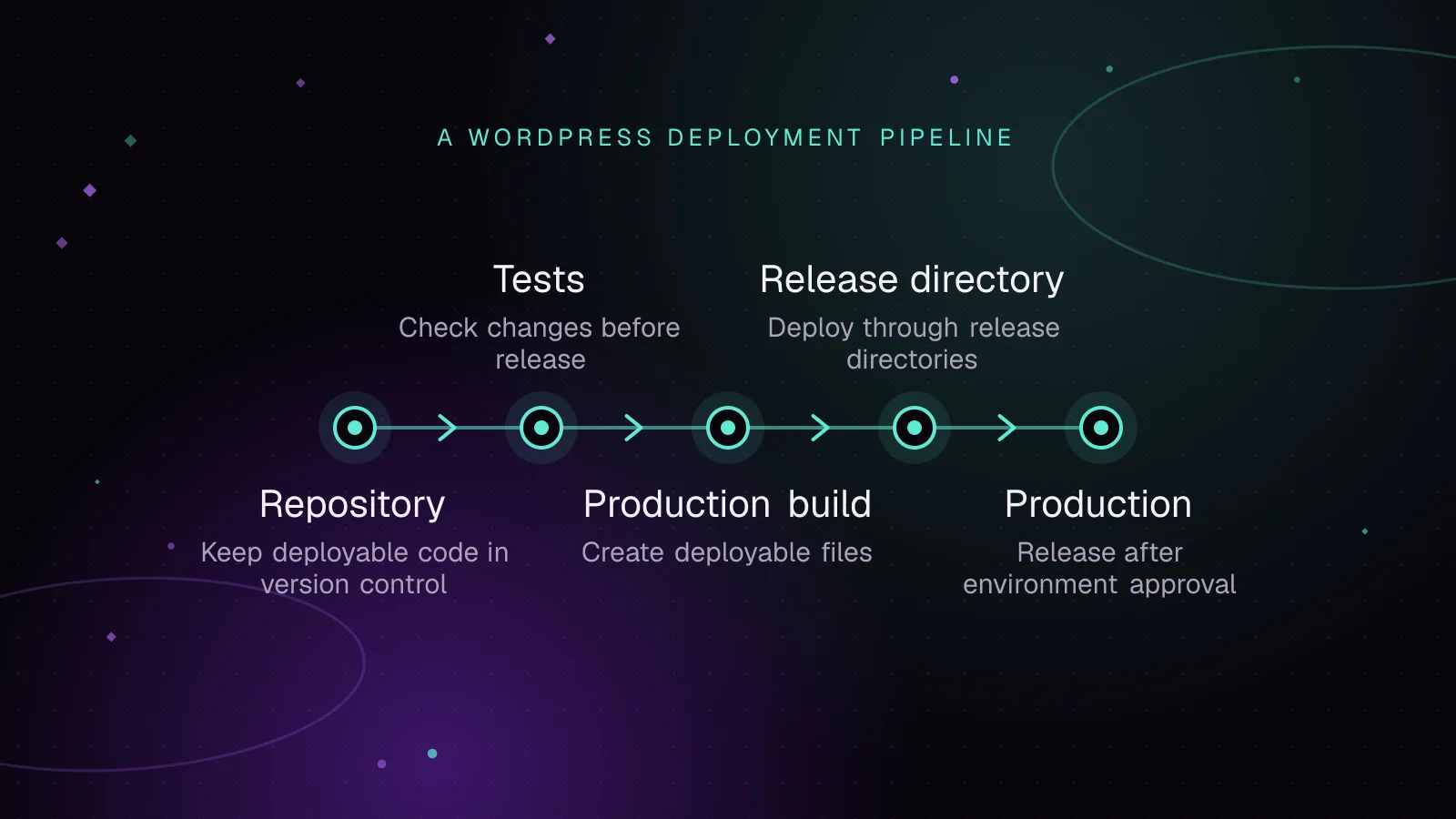
A useful pipeline has separate concerns. Pull requests run checks. CI builds the deployable files. Only an accepted change on the deployment branch can reach production.
GitHub documents the available job, event, permission, environment, dependency, and concurrency fields in its workflow syntax (opens in a new tab).
Run PHPCS and tests before merge
Running PHPCS in GitHub Actions makes coding-standard failures visible before code reaches the deployment branch. Keep the ruleset in the repository so local runs and CI use the same rules.
The maintained PHP_CodeSniffer project (opens in a new tab) supports supplying a ruleset with --standard. The command below also supplies the repository root as the path to inspect.
Tests should fail the workflow through PHPUnit's exit status. This example assumes your committed phpunit.xml and test bootstrap already describe how the suite starts WordPress or isolates the code being tested.
The current WordPress requirements (opens in a new tab) recommend PHP 8.3 or greater, so the example uses PHP 8.3. Your CI should also cover the PHP version that production runs.
Build once and pass the artifact forward
The WordPress CI CD GitHub Actions workflow below has quality, test, build, and deploy jobs. The build job creates the files that the deploy job receives, rather than rebuilding on the production server.
name: CI and deploy

on:
  pull_request:
  push:
    branches:
      - main

permissions:
  contents: read

jobs:
  quality:
    runs-on: ubuntu-latest
    steps:
      - uses: actions/checkout@v7

      - uses: shivammathur/setup-php@v2
        with:
          php-version: '8.3'
          coverage: none
          tools: composer:v2

      - name: Install PHP development dependencies
        run: composer install --no-interaction --no-progress --prefer-dist

      - name: Run PHPCS
        run: vendor/bin/phpcs --standard=phpcs.xml .

  tests:
    runs-on: ubuntu-latest
    steps:
      - uses: actions/checkout@v7

      - uses: shivammathur/setup-php@v2
        with:
          php-version: '8.3'
          coverage: none
          tools: composer:v2

      - name: Install PHP development dependencies
        run: composer install --no-interaction --no-progress --prefer-dist

      - name: Run PHPUnit
        run: vendor/bin/phpunit

  build:
    runs-on: ubuntu-latest
    steps:
      - uses: actions/checkout@v7

      - uses: shivammathur/setup-php@v2
        with:
          php-version: '8.3'
          coverage: none
          tools: composer:v2

      - uses: actions/setup-node@v7
        with:
          node-version-file: '.nvmrc'
          package-manager-cache: false

      - name: Install production PHP dependencies
        run: composer install --no-dev --prefer-dist --no-interaction --no-progress --optimize-autoloader

      - name: Install JavaScript dependencies
        run: npm ci

      - name: Build front-end assets
        run: npm run build

      - name: Assemble release
        run: |
          mkdir -p release
          cp -a public release/public
          cp -a vendor release/vendor

      - uses: actions/upload-artifact@v7
        with:
          name: wordpress-release-${{ github.sha }}
          path: release/

  deploy:
    if: github.event_name == 'push' && github.ref == 'refs/heads/main'
    needs: [quality, tests, build]
    runs-on: ubuntu-latest
    environment: production
    concurrency: production

    env:
      DEPLOY_HOST: ${{ vars.DEPLOY_HOST }}
      DEPLOY_USER: ${{ vars.DEPLOY_USER }}
      DEPLOY_PORT: ${{ vars.DEPLOY_PORT }}
      DEPLOY_ROOT: ${{ vars.DEPLOY_ROOT }}

    steps:
      - uses: actions/download-artifact@v8
        with:
          name: wordpress-release-${{ github.sha }}
          path: release

      - name: Configure SSH
        run: |
          mkdir -p "$HOME/.ssh"
          printf '%s\n' "${{ secrets.DEPLOY_SSH_KEY }}" > "$HOME/.ssh/id_ed25519"
          printf '%s\n' "${{ secrets.DEPLOY_KNOWN_HOSTS }}" > "$HOME/.ssh/known_hosts"
          chmod 600 "$HOME/.ssh/id_ed25519"

      - name: Upload and switch release
        run: |
          set -eu

          RELEASE="$DEPLOY_ROOT/releases/$GITHUB_SHA"
          TARGET="$DEPLOY_USER@$DEPLOY_HOST"

          ssh -i "$HOME/.ssh/id_ed25519" -p "$DEPLOY_PORT" \
            -o StrictHostKeyChecking=yes \
            "$TARGET" "mkdir -p '$RELEASE'"

          rsync -az --delete \
            -e "ssh -i $HOME/.ssh/id_ed25519 -p $DEPLOY_PORT -o StrictHostKeyChecking=yes" \
            release/ "$TARGET:$RELEASE/"

          ssh -i "$HOME/.ssh/id_ed25519" -p "$DEPLOY_PORT" \
            -o StrictHostKeyChecking=yes \
            "$TARGET" "
              ln -s '$DEPLOY_ROOT/shared/uploads' '$RELEASE/public/wp-content/uploads'
              ln -s '$DEPLOY_ROOT/shared/wp-config.php' '$RELEASE/wp-config.php'
              ln -sfnT '$RELEASE' '$DEPLOY_ROOT/current.next'
              mv -Tf '$DEPLOY_ROOT/current.next' '$DEPLOY_ROOT/current'
            "
The example assumes the deployable web root is public/, Composer dependencies are needed from the project-level vendor/ directory, and the remote host uses GNU coreutils. Adapt those paths to your application rather than copying them unchanged.
For readability, the workflow uses action major-version tags. A production repository can pin actions to reviewed full commit SHAs so a moving tag cannot change the code executed by the workflow.
Build production files before the deploy job
For a Composer WordPress deploy, let CI produce the production dependency tree. Do not run dependency resolution while visitors are using the release.
composer install reads the committed lock file when one exists. The production build adds --no-dev so development packages are left out, while --optimize-autoloader prepares the production autoloader.
The quality and test jobs need development dependencies because tools such as PHPCS and PHPUnit are commonly declared there. That is why those jobs use a normal install while the release build does not.
The same rule applies to JavaScript. npm ci installs from the lock file, then the project's build script creates the CSS, JavaScript, or other generated assets. The artifact needs those generated files, not node_modules unless your runtime specifically depends on it.
Building once also means the deploy job receives the exact artifact produced earlier in that workflow run. A failed production upload does not trigger a fresh Composer or npm resolution.
Deploy WordPress with GitHub Actions through release directories
To deploy WordPress with GitHub Actions safely, upload into a new release directory rather than synchronizing files directly over the live document root.
A WordPress deployment pipeline can keep this server layout:
/srv/site/
├── current -> /srv/site/releases/<active-release>
├── releases/
│   ├── <release-a>/
│   └── <release-b>/
└── shared/
    ├── uploads/
    └── wp-config.php
Each Git commit SHA gives the workflow a unique release path. rsync --delete is therefore limited to that release directory. It does not delete files from the live shared uploads directory.
Switch the symlink only after the upload succeeds
The final commands create current.next, then rename it over current. Keep both links on the same filesystem. On GNU systems, mv -T treats the destination as the link itself rather than following a link to a directory.
Your web server points at $DEPLOY_ROOT/current/public. Requests continue using the previous release while the new files are transferred. The switch happens only after the upload and shared links are ready.
After the symlink switch, the WordPress OPcache settings guide explains revalidation and cache resets after deploys, because PHP-FPM can keep serving cached bytecode from the previous release until OPcache revalidates the files or is reset.
An atomic switch is one part of a zero downtime WordPress deploy. Old and new application code must also tolerate the database schema that exists while the release changes.
Replace SSH with the host's deployment interface when needed
Managed WordPress platforms may not provide SSH access that fits this release pattern. Keep the test and build stages, then replace only the deployment job with the host's supported Git, API, CLI, or deployment service.
WordPress VIP supports CI/CD build flows and documents GitHub Actions in its WordPress VIP CI/CD documentation (opens in a new tab). Its deployment model should be used instead of adding an unsupported rsync layer.
At Gallery Media Group I shipped changes on WordPress VIP through the team's review and deployment process.
Protect deployment secrets, environments and approvals
Create a GitHub production environment for the deploy job. GitHub's environments documentation (opens in a new tab) confirms that protection rules can gate a job before it runs or gains access to that environment's secrets.
Put private material such as the SSH key in environment secrets. Host name, user, port, and deployment path are configuration rather than credentials, so environment variables are a better fit for them.
A known_hosts entry is public information, but its trust matters. Obtain and verify the server host key outside the deployment session. Do not disable host-key checking merely to make unattended SSH connect.
The workflow gives the GitHub token only contents: read. Pull-request jobs never reference deployment secrets. The deploy job runs only after the quality, test, and build jobs succeed on a push to main.
concurrency: production also prevents two jobs in that concurrency group from deploying at the same time. Add required reviewers and deployment-branch restrictions to the production environment when your GitHub plan and repository configuration support them.
Keep rollback separate from database rollback
An atomic release layout makes code rollback small. Point current at a previous release rather than copying old files back over the live tree.
For a GNU/Linux host, the same switch pattern can be used:
set -eu

DEPLOY_ROOT=/srv/site
PREVIOUS_RELEASE="$DEPLOY_ROOT/releases/previous-release"

ln -sfnT "$PREVIOUS_RELEASE" "$DEPLOY_ROOT/current.next"
mv -Tf "$DEPLOY_ROOT/current.next" "$DEPLOY_ROOT/current"
That code rollback is safe only while the previous code can still use the current database schema.
Handle schema changes as ordered, versioned migrations owned by the application. Record successful migrations so the same change is not applied repeatedly.
Prefer changes that remain compatible with the previous release. Add a new table, column, or data shape before removing the old one. Code can move to the new structure first, then a later release can remove obsolete structures after older code is gone.
Do not place a production SQL dump in Git, and do not make database replacement part of the normal deploy job. A destructive migration needs a separate recovery plan because changing the code symlink cannot restore lost data.
What to do next
Start with pull-request checks, then make CI build the exact production artifact. Add a staging environment, test the symlink switch and rollback there, then put the production job behind a protected GitHub environment.
For VIP releases, compare the pipeline with the WordPress VIP development guide. If CI/CD is part of a platform move, use the WordPress VIP migration checklist to keep deployment work separate from migration work. For help implementing or reviewing the release process, the WordPress VIP development service covers that engineering work.
Frequently asked questions
Should I commit wp-content/uploads to Git?
No. Production uploads are runtime content and should persist outside individual code releases. Link or mount that persistent storage into each release instead of copying media through Git.
Should GitHub Actions deploy the WordPress database?
A routine code deployment should not replace the WordPress database. Handle required schema changes with ordered versioned migrations, while content, settings, customers, and orders remain in the live database.
Can GitHub Actions deploy only a WordPress theme or plugin?
Yes, if that package is independent and your hosting model supports isolated package releases. If themes, plugins, Composer packages, and built assets depend on each other, a single tested application artifact gives you a clearer release boundary.
How do I roll back a failed WordPress deployment?
With release directories, point the live symlink back to the previous tested release. Code rollback remains simple while database migrations are backward-compatible; a destructive schema or data change needs its own planned recovery path.
Share this article
Enjoyed this? Get the next article by email.
Keep reading
 Enterprise
7 min read
Must-use plugins in WordPress: what belongs there and how to load them
Use WordPress MU plugins safely: choose platform code, control load order, load subdirectories, verify status, and avoid activation and update traps.
- WordPress
- Enterprise
- Plugins
 Enterprise
7 min read
Migrating to WordPress VIP: a technical checklist
Plan a WordPress VIP migration from code audit to imports, testing, DNS launch, rollback, and monitoring with current VIP commands and checks.
- WordPress VIP
- Enterprise
- Migration
 Enterprise
7 min read
High-traffic WordPress architecture: the layers that carry the load
High traffic WordPress architecture explained: edge caching, PHP workers, object cache, database scaling, media offload, and load testing.
- WordPress
- Architecture
- Performance