Development7 min read
WordPress Script Modules: load ES modules the WordPress way
Use WordPress Script Modules to register ES modules, manage imports and dependencies, pass data, translate strings, and test optimizer compatibility.
 By Hamza Ahmad AslamWordPress VIP, Performance & Full-Stack Engineer
On this page
- What WordPress Script Modules do
- How script modules differ from wp_enqueue_script
- How to register, enqueue, and declare dependencies
- How the import map and module preloads are printed
- How to load a block module with viewScriptModule
- How to pass PHP data and translations to a module
- How to keep caching and optimization plugins from breaking modules
- What to do next
- Frequently asked questions
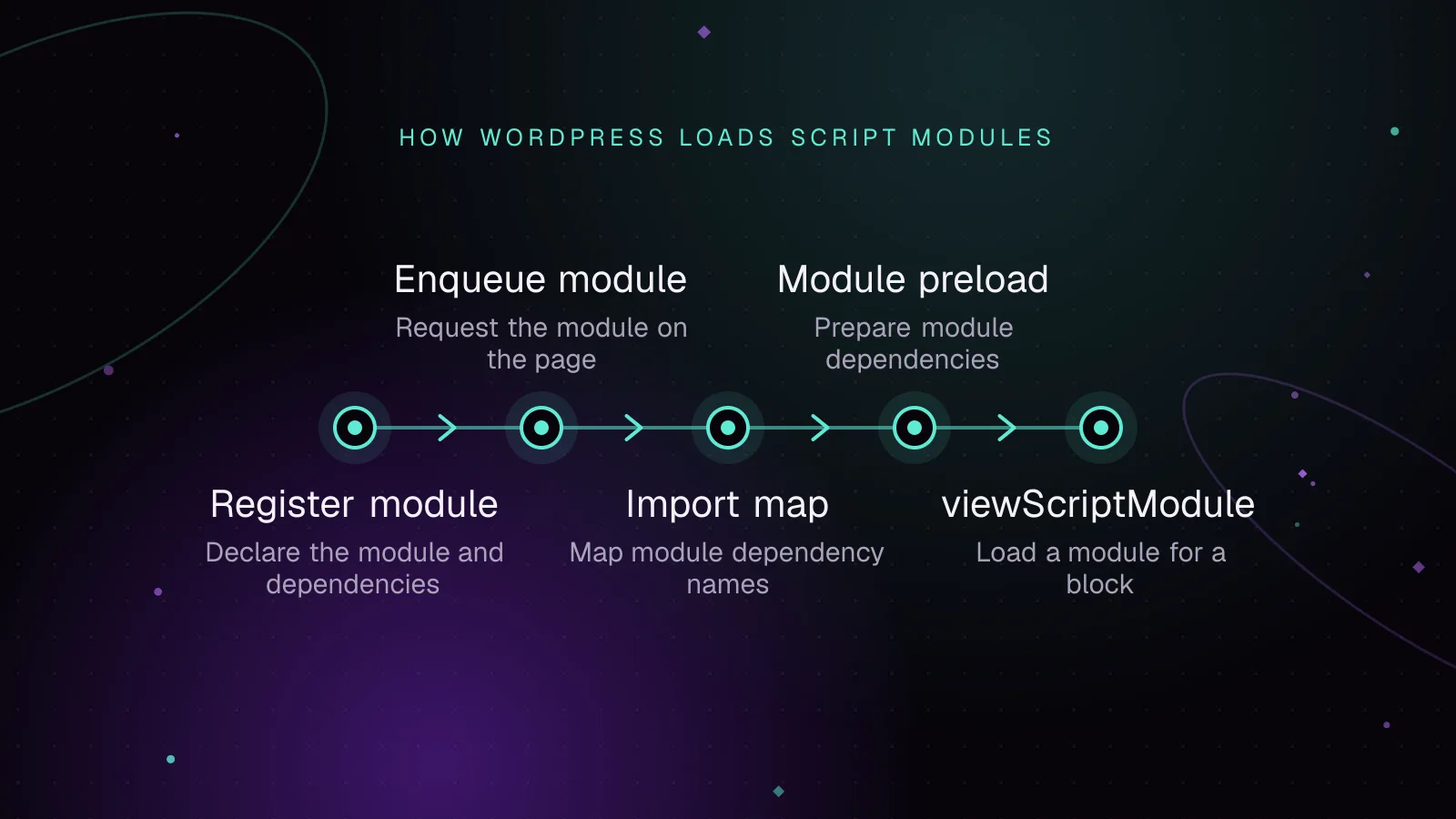
Short answer: WordPress Script Modules are the core API for registering and loading front-end ES modules with named dependencies. Since WordPress 6.5, you can let WordPress build the import map, preload static module dependencies, and print the module entry point in the right order.
What WordPress Script Modules do
The Script Modules API arrived in WordPress 6.5. It gives plugins and themes a WordPress-managed path for browser-native JavaScript modules, including import and export. The WordPress 6.5 Script Modules dev note (opens in a new tab) documents the original API and its dependency model.
A script module has an ID, a source URL, dependencies, and an optional version. WordPress tracks that graph. When you enqueue an entry module, WordPress can map dependency IDs to URLs and tell the browser which static dependencies to fetch early.
The ID is the stable name other modules import. The source is where the browser fetches the file. Keeping those separate means you can change a built file URL without changing every import statement that uses the module ID.
Registration and enqueueing also solve different problems. Register a module when another module may depend on it. Enqueue the entry point that should execute on the page. A registered dependency does not need a second enqueue call just because an enqueued module imports it.
This matters when your source contains a bare import such as:
import { formatPrice } from '@acme/shared';
A browser cannot resolve @acme/shared from that string alone. The import map WordPress prints supplies the URL.
Use this API for JavaScript that is authored as an ES module or depends on another registered module. Keep classic JavaScript on the Scripts API when it expects classic script handles or globals.
How script modules differ from wp_enqueue_script
wp_enqueue_script() remains the API for classic scripts. Its dependency list contains classic script handles, and it can apply classic loading strategies such as defer or async. The current wp_enqueue_script() reference (opens in a new tab) also documents module_dependencies, added in WordPress 7.0 for classic scripts that use dynamic imports.
That WordPress 7.0 addition does not turn a classic script into an ES module. It lets a classic script declare module IDs that it may load dynamically, so WordPress can include those IDs in the import map.
For a module entry point, use the Script Modules API. Modules execute with module scope, use import and export, and are deferred by browser module semantics. Do not treat a script handle and a script module ID as interchangeable dependency names.
There is another difference around data. Classic script code has long used inline JavaScript helpers. Script modules instead have a server-to-client data channel designed for JSON, covered below.
Choose the API from the file you are shipping, not from a preference for newer syntax. A file built as a classic bundle should stay on the classic API. An ES module entry point with bare imports belongs on the module API so WordPress can resolve its dependency graph.
How to register, enqueue, and declare dependencies
The main registration function is wp_register_script_module() (opens in a new tab). wp_enqueue_script_module() can enqueue a registered module, or register and enqueue one when you also pass its source.
This plugin example registers two dependencies, then enqueues an entry module on the front end:
<?php
add_action(
    'wp_enqueue_scripts',
    function () {
        wp_register_script_module(
            '@acme/shared',
            plugins_url( 'assets/shared.js', __FILE__ ),
            array(),
            null
        );

        wp_register_script_module(
            '@acme/dialog',
            plugins_url( 'assets/dialog.js', __FILE__ ),
            array(),
            null
        );

        wp_enqueue_script_module(
            '@acme/app',
            plugins_url( 'assets/app.js', __FILE__ ),
            array(
                '@acme/shared',
                array(
                    'id'     => '@acme/dialog',
                    'import' => 'dynamic',
                ),
            ),
            null
        );
    }
);
A string dependency is static. The array form can set import to dynamic. If you omit import in that array form, the dependency is static.
The null version in this example tells WordPress not to append a version query parameter. For production, pass the version generated by your build so a changed file gets a changed URL.
The entry module can then use both forms:
import { formatPrice } from '@acme/shared';

const priceNode = document.querySelector( '[data-price]' );

if ( priceNode ) {
    priceNode.textContent = formatPrice( priceNode.dataset.price );
}

document.querySelector( '[data-open-dialog]' )?.addEventListener(
    'click',
    async () => {
        const { openDialog } = await import( '@acme/dialog' );
        openDialog();
    }
);
Declare every bare module import in the PHP dependency graph. A static dependency is expected during normal module evaluation. A dynamic dependency may load only when code reaches import().
How the import map and module preloads are printed
WordPress builds an import map from dependencies reachable from the modules needed on the page. The import map maps a module ID to its versioned source URL. WordPress does not need to place the enqueued entry module itself in that map unless another module depends on it.
For the PHP example above, Example output could look like this:
<script type="importmap" id="wp-importmap">
{"imports":{"@acme/shared":"https://example.com/wp-content/plugins/acme/assets/shared.js","@acme/dialog":"https://example.com/wp-content/plugins/acme/assets/dialog.js"}}
</script>
WordPress also prints modulepreload links for static dependencies of enqueued modules. That lets the browser discover those files before it reaches the import that needs them.
A preload is a fetch hint, not a second execution path. The dependency still executes through the normal module graph when the importing module evaluates. This distinction matters when you inspect the Network panel and see a dependency requested before the entry module reaches its import statement.
Dynamic dependencies still belong in the import map, because a later import() must resolve the ID. They are not included in the static dependency preload set just because they were declared.
Do not hard-code assumptions about whether these tags will be in the head or footer. WordPress controls placement based on the active rendering path and module settings. Verify the generated HTML when debugging an optimizer or cache layer.
How to load a block module with viewScriptModule
WordPress 6.5 also added viewScriptModule to block metadata. The block.json metadata reference (opens in a new tab) defines it as a front-end script module field.
A block can point directly to its module file:
{
    "viewScriptModule": "file:./view.js"
}
When the block is registered from metadata, WordPress registers the file as a script module and enqueues it when the block is rendered on the front end. That keeps block-specific JavaScript off pages where the block is absent.
If view.js imports registered modules, put those dependencies in the matching asset metadata file beside the built JavaScript. The WordPress build tooling can generate that asset file for module builds. Its dependency data is what lets WordPress build the import map for the block.
Use viewScriptModule for a module. Use viewScript for a classic front-end script. They describe different loading systems.
How to pass PHP data and translations to a module
Script modules do not get an inline configuration object merely because you enqueue them. Since WordPress 6.7, the script_module_data_{$module_id} filter can attach essential initialization data to an enqueued module or module dependency.
For @acme/app, the filter name includes the module ID:
<?php
add_filter(
    'script_module_data_@acme/app',
    function ( array $data ): array {
        $data['screen'] = 'catalog';
        return $data;
    }
);
WordPress serializes non-empty data into an application/json script element whose ID starts with wp-script-module-data-. Your module reads and parses that JSON:
const dataContainer = document.querySelector(
    'script[id="wp-script-module-data-@acme/app"]'
);

let config = {};

if ( dataContainer instanceof HTMLScriptElement ) {
    try {
        config = JSON.parse( dataContainer.text );
    } catch {}
}
Use that channel for data required at initialization. For larger or later data, fetch it when needed instead of embedding the whole payload in the page.
Translation handling changed in WordPress 7.0. WordPress can load translation data for script modules, and wp_set_script_module_translations() (opens in a new tab) lets you override the text domain or translation path after the module is registered.
For a plugin text domain:
<?php
wp_set_script_module_translations( '@acme/app', 'acme' );
The function is for module translations, while wp_set_script_translations() belongs to classic scripts. Do not swap the two APIs.
How to keep caching and optimization plugins from breaking modules
Page caching and browser caching do not require special handling just because a file is an ES module. Problems start when a JavaScript optimizer rewrites the tags or their order without understanding import maps and module semantics.
Treat these transformations as risk points:
- Do not combine a
type="module"entry point into a classic JavaScript bundle. - Do not move the import map after a module that needs its bare IDs.
- Preserve
type="module",type="importmap", andrel="modulepreload"when HTML is rewritten. - Exclude module assets from a delay feature if that feature changes execution order or rewrites module tags as classic scripts.
Test with the optimization feature disabled first. Confirm the feature works, then enable one JavaScript transformation at a time.
In page source, check that wp-importmap appears before a module that needs its mappings. In browser developer tools, confirm static dependencies are requested as expected and a dynamic dependency is requested only when its code path runs. Check the console for import-map and unresolved-module errors.
Then test a page that uses the module and a page that does not. For blocks, confirm viewScriptModule assets stay off the page when the block is absent. Repeat the test after purging page, CDN, and optimizer caches so old HTML does not hide an ordering problem.
If you use prerendering, the guide to WordPress speculative loading settings and store-safe exclusions explains how a prerendered page can run module code before the visitor opens it.
What to do next
Start by moving one isolated front-end feature to modules and test it with your production cache and JavaScript optimizer. If the same page has broader loading issues, use the WordPress LCP image optimization guide to separate image work from JavaScript work, and review the article on WooCommerce cart fragments before changing store-side scripts.
For a plugin or theme that needs a larger asset architecture change, the custom WordPress development service covers custom builds and front-end integration.
Frequently asked questions
Are script modules supported in WordPress 6.4?
No. The Script Modules API and viewScriptModule were introduced in WordPress 6.5. Code that requires those APIs needs WordPress 6.5 or a compatibility path for older installs.
Does wp_enqueue_script load ES modules?
wp_enqueue_script() is still the classic Scripts API. Since WordPress 7.0, a classic script can declare module dependencies for dynamic imports, but the script itself remains a classic script.
Why is my module import failing with a bare specifier error?
The browser usually cannot resolve a bare ID such as @acme/shared without an import map entry. Check that the dependency is registered, declared in the module dependency graph, and present in the WordPress import map before the module executes.
Should an optimization plugin defer script modules?
ES module scripts already use deferred module execution semantics in the browser. Test any extra delay or combine feature carefully, because changing import-map order or converting module tags into classic scripts can break dependency resolution.
Share this article
Enjoyed this? Get the next article by email.
Keep reading
 Development
5 min read
Headless WordPress with Next.js: when it fits
Decide whether headless WordPress with Next.js fits your site. Review plugin compatibility, previews, caching, hosting and the work involved.
- WordPress
- Next.js
- Headless CMS
 Development
7 min read
End-to-end WordPress Playwright testing for editor, admin and checkout
Use WordPress Playwright testing to automate block editor, admin, and WooCommerce checkout flows with saved login state, stable data, traces, and CI.
- WordPress
- Testing
- JavaScript
 Development
7 min read
"This block contains unexpected or invalid content": fixing validation errors
Fix a block validation failed WordPress error by reading the markup mismatch, adding a deprecation, migrating attributes, or switching to render.php.
- Gutenberg Blocks
- WordPress
- JavaScript