Development7 min read
The WordPress Interactivity API: add front-end behavior to a custom block
Use the WordPress Interactivity API to build a custom interactive block with directives, store actions, server-rendered state, and script modules.
 By Hamza Ahmad AslamWordPress VIP, Performance & Full-Stack Engineer
On this page
- What the WordPress Interactivity API changes in a custom block
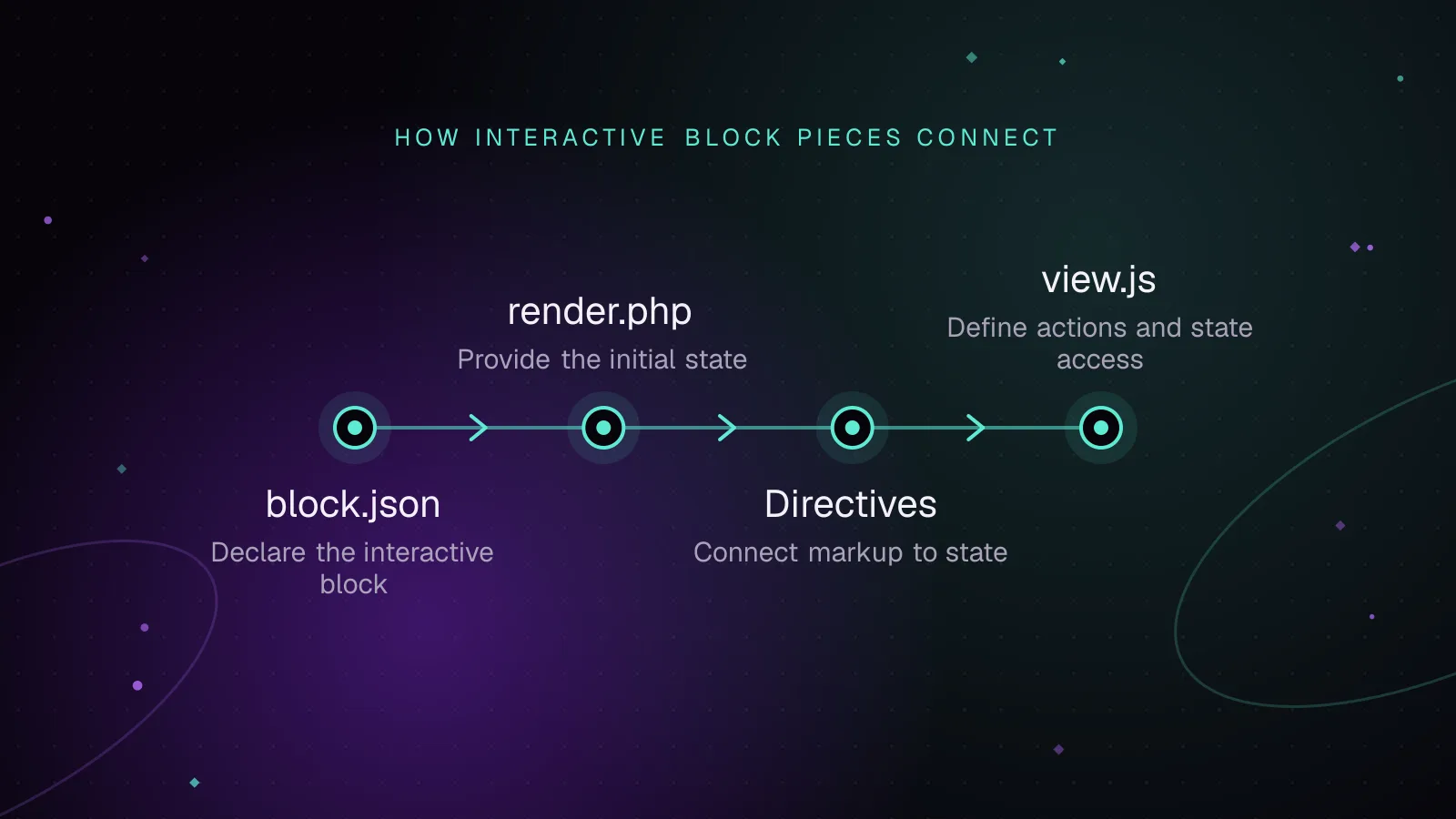
- How to declare the interactive block in block.json
- How the directives connect markup to state
- How render.php provides the first correct state
- How view.js defines store actions and state access
- What viewScriptModule changes for performance
- Common mistakes that make interactive blocks harder to debug
- When a plain script or no JavaScript is the better choice
- What to do next
- Frequently asked questions
Short answer: The WordPress Interactivity API gives custom blocks a standard way to connect front-end HTML to state and JavaScript actions. Since WordPress 6.5, you can declare an interactive block in block.json, add directives to server-rendered markup, and load behavior through a script module.
What the WordPress Interactivity API changes in a custom block
Before this API, a custom block often shipped a small script that queried the DOM, attached event listeners, stored local values, and updated classes or text. That works, but each block can invent its own event and state rules.
The official Interactivity API reference (opens in a new tab) describes the API as the standard front-end interaction system for blocks. It entered WordPress core in 6.5. The same release added the Script Modules API that the Interactivity API uses.
The model has two main parts. Directives are data-wp-* attributes in your markup. A store holds state and actions that those directives can read or call.
PHP can render the first interface state, while JavaScript takes over later without rebuilding the component.
The example is a details card with a heading, status line, button, and hidden panel. The button changes its label and toggles the panel.
How to declare the interactive block in block.json
Assume the block already has its editor code and server registration. These are the front-end metadata fields that matter for this example:
{
  "$schema": "https://schemas.wp.org/trunk/block.json",
  "apiVersion": 3,
  "name": "hamza/details-card",
  "title": "Details card",
  "category": "widgets",
  "textdomain": "hamza-blocks",
  "attributes": {
    "heading": {
      "type": "string"
    },
    "details": {
      "type": "string"
    }
  },
  "supports": {
    "interactivity": true
  },
  "render": "file:./render.php",
  "viewScriptModule": "file:./view.js"
}
supports.interactivity tells WordPress that the block uses Interactivity API directive processing. viewScriptModule tells WordPress to load view.js as a Script Module on the front end. The block metadata reference (opens in a new tab) documents viewScriptModule as available since WordPress 6.5.
Block API version 3 is the current Block API version. It was introduced in WordPress 6.3.
If your build already uses @wordpress/scripts, its current Interactivity API docs still require module compilation for viewScriptModule. Your package scripts should include the module flag:
{
  "scripts": {
    "build": "wp-scripts build --experimental-modules",
    "start": "wp-scripts start --experimental-modules"
  }
}
Your project also needs the Interactivity package available to the build:
npm install @wordpress/interactivity --save
How the directives connect markup to state
For this block, use global state for strings shared by every instance. Use local context for values that belong to one card, such as whether that card is open.
That separation prevents one card from changing another card by mistake.
The directives and store reference (opens in a new tab) documents the directives used here:
data-wp-interactiveactivates an interactive region and selects its store namespace.data-wp-contextprovides local data to that element and its descendants.data-wp-on--clickcalls a store action for a click event.data-wp-bind--aria-expandedbinds an HTML attribute to context.data-wp-bind--hiddenadds or removes thehiddenattribute from a state value.data-wp-textwrites a state or context value into an element.
The data-wp-bind directive takes the target attribute after the second double hyphen. That is why the example uses data-wp-bind--hidden and data-wp-bind--aria-expanded.
How render.php provides the first correct state
A dynamic block should not wait for JavaScript before it shows the right text or visibility. WordPress can process Interactivity API directives on the server.
This render.php sets shared state with wp_interactivity_state(). It also creates local context with wp_interactivity_data_wp_context().
<?php
$namespace = 'hamza/details-card';

wp_interactivity_state(
	$namespace,
	array(
		'statusText' => __( 'More details are available.', 'hamza-blocks' ),
		'labels'     => array(
			'open'  => __( 'Show details', 'hamza-blocks' ),
			'close' => __( 'Hide details', 'hamza-blocks' ),
		),
	)
);

$context = array(
	'isOpen'      => false,
	'buttonLabel' => __( 'Show details', 'hamza-blocks' ),
);
?>

<div
	<?php echo get_block_wrapper_attributes(); ?>
	data-wp-interactive="hamza/details-card"
	<?php echo wp_interactivity_data_wp_context( $context ); ?>
>
	<h3><?php echo esc_html( $attributes['heading'] ?? '' ); ?></h3>

	<p data-wp-text="state.statusText"></p>

	<button
		type="button"
		data-wp-on--click="actions.toggle"
		data-wp-bind--aria-expanded="context.isOpen"
	>
		<span data-wp-text="context.buttonLabel"></span>
	</button>

	<div data-wp-bind--hidden="!context.isOpen">
		<p><?php echo esc_html( $attributes['details'] ?? '' ); ?></p>
	</div>
</div>
wp_interactivity_state() initializes global state for the hamza/details-card namespace. WordPress serializes that state for the client, so view.js can read the same values.
The local context starts with isOpen set to false. It also contains the first button label. Since the server processes data-wp-text and data-wp-bind--hidden, the response already contains the status text and the correct hidden state.
This avoids a flash where the panel appears before JavaScript hides it. The server-side directive processing guide (opens in a new tab) explains how state and context are applied before the HTML reaches the browser.
Keep block-specific values in context when a page can contain several instances. Global state is shared by every element using the same store namespace.
That distinction is easy to miss. If isOpen lived in global state, every card using that namespace would read the same value. One click could then open or close several cards. Context keeps that value scoped to the current interactive region, while shared labels stay in one store.
Server rendering also gives you a useful debugging checkpoint. View the page source before testing clicks. The status line should already contain text, and the details panel should already carry the hidden attribute. If those values only appear after JavaScript runs, the initial state or server directive processing is incomplete.
How view.js defines store actions and state access
The client code can stay small because the HTML already declares which elements react to which values.
import { getContext, store } from '@wordpress/interactivity';

const { state } = store( 'hamza/details-card', {
	actions: {
		toggle() {
			const context = getContext();

			context.isOpen = ! context.isOpen;
			context.buttonLabel = context.isOpen
				? state.labels.close
				: state.labels.open;
		},
	},
} );
store() connects the hamza/details-card namespace to its actions. The server-created state is available through state, so there is no need to repeat the labels in JavaScript.
getContext() returns the local context for the element whose directive triggered the action. That is why clicking one card updates that card rather than every card on the page.
After context.isOpen changes, data-wp-bind--hidden reacts and updates the panel. The bound aria-expanded value changes too. Updating context.buttonLabel causes data-wp-text to replace the button text.
This is the main difference from an ad hoc script. You change data, and the directives update the related DOM properties.
What viewScriptModule changes for performance
A viewScriptModule is an ES module registered through WordPress rather than a classic script handle. For the module loading details behind that field, the guide to loading ES modules through WordPress Script Modules explains how WordPress registers and resolves them.
Your module imports @wordpress/interactivity as a dependency.
The important part is dependency handling. You do not need to package another copy of the Interactivity API runtime inside each interactive block bundle. WordPress registers the module dependency and resolves it through the Script Modules system.
Block metadata also lets WordPress associate the front-end module with the block. That keeps the block-specific code tied to pages where the block is rendered.
This does not make JavaScript free. Your actions can still do expensive work, create long tasks, or trigger large DOM changes. Keep handlers narrow and avoid adding client work that PHP can finish before the response.
The module boundary also makes dependencies clearer. Your block owns its view.js, while WordPress owns the registered Interactivity module it imports. That avoids copying the same runtime into every block package. Your own code can still grow, so keep each action focused on the state change the interface needs.
For user-facing performance checks, measure the page rather than assuming a smaller source file solved the problem. Interaction cost still matters after the module loads.
Common mistakes that make interactive blocks harder to debug
Start with the rendered HTML, not the source template. If the server processed the directives, the response should already reflect initial text and bound attributes.
Check these problems first:
- Missing
supports.interactivitycan stop server directive processing for the block. - A namespace mismatch between
data-wp-interactive,wp_interactivity_state(), andstore()disconnects markup from its data. - Putting per-instance values in global state can make several block instances affect each other.
- Using
viewScriptinstead ofviewScriptModuleprevents the module from depending on@wordpress/interactivitythrough the Script Modules API. - Defining the initial state only in JavaScript can leave the first server render out of sync with the hydrated interface.
- Editing the DOM directly inside an action can fight the directives that are already responsible for that attribute or text.
In browser DevTools, inspect the button and panel after a click. Confirm that aria-expanded, hidden, and text change together. Then check the console for module import or action lookup errors.
If a directive does nothing, compare the directive value with the exact store path. actions.toggle must exist under actions in the selected namespace.
When a plain script or no JavaScript is the better choice
Use the API when the block has state that changes the DOM, several elements need to stay in sync, or PHP must provide the initial state. It also fits blocks that need to share data with other interactive regions.
A plain script can be simpler for isolated behavior with no reactive state. For example, a one-off integration that only calls a third-party library may not gain much from directives.
Use no JavaScript when native HTML already provides the behavior. A normal link, form control, or <details> element can often handle simple interactions with less code.
Do not convert existing front-end code only to follow a newer API. The migration should reduce custom state and event plumbing, or give you server-rendered state that your old script lacked.
What to do next
Build the card first with server-rendered text and visibility, then add the action. After it works, check the page against the Core Web Vitals budget calculator. If the block includes the page's largest image, use the WordPress LCP image optimization guide to keep that asset out of the interaction work.
For a block that needs custom editor controls, dynamic rendering, and front-end behavior as one package, the custom WordPress development service covers that implementation work.
Frequently asked questions
Does the Interactivity API replace jQuery in WordPress blocks?
It can replace many block-specific jQuery patterns that attach events and update DOM state. It does not remove jQuery from WordPress, and an existing library that depends on jQuery can still use it.
Can the Interactivity API be used with dynamic blocks?
Yes. Dynamic blocks are a strong fit because render.php can output directives, local context, and server state before the browser runs JavaScript. WordPress can then process supported directives during server rendering.
Does an interactive block still work when JavaScript is disabled?
The server-rendered content still appears because PHP produces the initial HTML. Actions such as toggling the panel will not run without JavaScript, so the initial markup should remain useful on its own.
Do I need React to use the Interactivity API on the front end?
No. The front-end API uses directives and the @wordpress/interactivity store rather than requiring you to render a React component. Your block editor can still use the normal WordPress block editor packages.
Share this article
Enjoyed this? Get the next article by email.
Keep reading
 Development
7 min read
"This block contains unexpected or invalid content": fixing validation errors
Fix a block validation failed WordPress error by reading the markup mismatch, adding a deprecation, migrating attributes, or switching to render.php.
- Gutenberg Blocks
- WordPress
- JavaScript
 Development
7 min read
WordPress Script Modules: load ES modules the WordPress way
Use WordPress Script Modules to register ES modules, manage imports and dependencies, pass data, translate strings, and test optimizer compatibility.
- WordPress
- JavaScript
- Performance
 Development
7 min read
End-to-end WordPress Playwright testing for editor, admin and checkout
Use WordPress Playwright testing to automate block editor, admin, and WooCommerce checkout flows with saved login state, stable data, traces, and CI.
- WordPress
- Testing
- JavaScript