Security7 min read
Secure WordPress REST API endpoints: permission callbacks that hold up
Review a WordPress REST API permission_callback, capability checks, nonces, argument schemas, output, logging, and rate limits for custom endpoints.
 By Hamza Ahmad AslamWordPress VIP, Performance & Full-Stack Engineer
On this page
- Why permission_callback is required and what __return_true exposes
- How to review a WordPress REST API permission_callback
- Match the capability to the action
- Put the object check in permission_callback
- How authentication should differ for browser users and external clients
- How to validate and sanitize endpoint arguments
- How to keep REST responses from leaking data
- How to rate-limit and log sensitive routes
- REST API review checklist
- What to do next
- Frequently asked questions
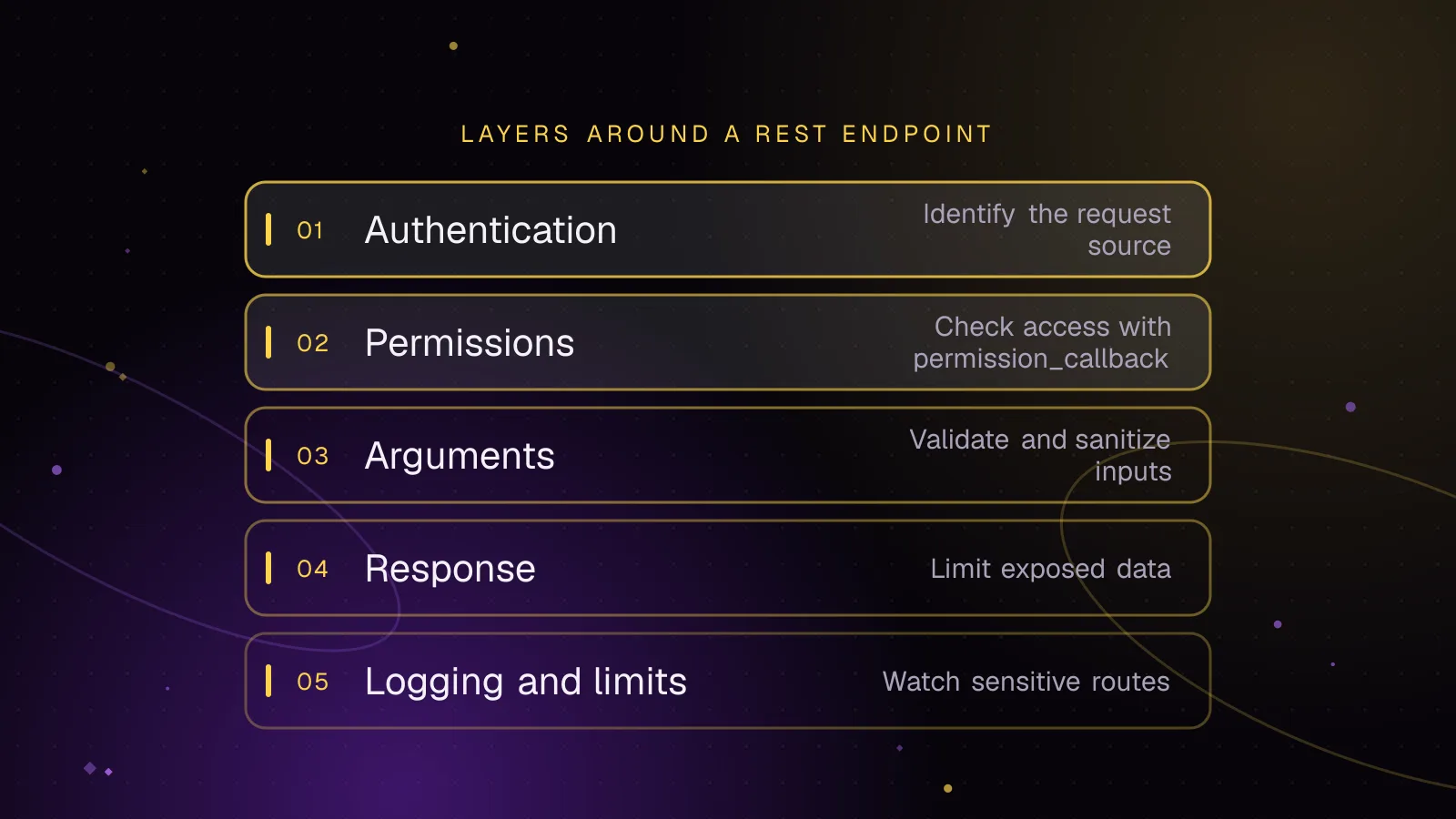
Short answer: A WordPress REST API permission_callback should answer one question: can this authenticated user perform this specific action on this specific object? Pair that check with the right authentication method, strict argument validation, a narrow response shape, and limits on expensive or sensitive requests.
Why permission_callback is required and what __return_true exposes
register_rest_route() registers the URL, method, callback, arguments and permission callback for a custom endpoint. Register routes on rest_api_init, as shown in the official custom endpoint documentation (opens in a new tab).
Since WordPress 5.5, omitting permission_callback causes a _doing_it_wrong() notice. The callback runs before your endpoint callback. It should return true to allow the request, false to deny it, or a WP_Error when you need a specific error.
__return_true is valid only when the route is meant to be public. It literally returns true, so it grants access to every caller who reaches that endpoint. That can be correct for public catalog data. It is wrong for profile edits, private records, exports, settings changes, destructive actions, or anything that spends money or server resources.
Do not treat a nonce as a substitute for a permission check. Authentication proves which WordPress user or application is making the request. Authorization decides what that identity may do.
How to review a WordPress REST API permission_callback
A useful review starts with the action, then works backward to the capability. Avoid broad checks that happen to pass for administrators but do not match the object being changed.
Match the capability to the action
For a route that edits a post, use the post edit capability rather than a generic logged-in check. WordPress can map a meta capability such as edit_post against a specific object ID. The current_user_can() reference (opens in a new tab) documents this object-aware form.
This matters when the current user owns some posts but not others. current_user_can( 'edit_post', $post_id ) lets WordPress map the request to the primitive capabilities required for that object. A user who may edit their own post does not automatically gain permission to edit someone else's.
The same pattern applies outside posts. Pick the capability that represents the operation, then include the object ID when that capability is object-aware. Do not hard-code role names such as administrator or editor when a capability check expresses the rule.
Put the object check in permission_callback
This route changes a post title. It validates and sanitizes both arguments, checks the requested post ID, and returns only the ID after a successful update.
<?php
add_action(
	'rest_api_init',
	function () {
		register_rest_route(
			'acme/v1',
			'/posts/(?P<id>\d+)/title',
			array(
				'methods'             => 'POST',
				'callback'            => 'acme_update_post_title',
				'permission_callback' => function ( WP_REST_Request $request ) {
					return current_user_can( 'edit_post', (int) $request['id'] );
				},
				'args'                => array(
					'id'    => array(
						'description'       => 'Post ID.',
						'type'              => 'integer',
						'required'          => true,
						'minimum'           => 1,
						'validate_callback' => 'rest_validate_request_arg',
						'sanitize_callback' => 'absint',
					),
					'title' => array(
						'description'       => 'New post title.',
						'type'              => 'string',
						'required'          => true,
						'minLength'         => 1,
						'pattern'           => '.*\S.*',
						'validate_callback' => 'rest_validate_request_arg',
						'sanitize_callback' => 'sanitize_text_field',
					),
				),
			)
		);
	}
);

function acme_update_post_title( WP_REST_Request $request ) {
	$updated = wp_update_post(
		wp_slash(
			array(
				'ID'         => (int) $request['id'],
				'post_title' => $request['title'],
			)
		),
		true
	);

	if ( is_wp_error( $updated ) ) {
		return $updated;
	}

	return array(
		'id' => $updated,
	);
}
The object ID is part of the authorization decision. That blocks the common failure where an authenticated subscriber, author, or other low-privilege account can change an object simply by replacing an ID in the URL.
Treat each WordPress REST API permission_callback as a server-side access-control rule. A hidden button, disabled form field, or JavaScript condition does not protect the endpoint.
How authentication should differ for browser users and external clients
For logged-in WordPress users, cookie authentication is the normal method. The REST API pairs those cookies with a nonce for cross-site request forgery protection. WordPress uses the wp_rest nonce action and accepts the token through the X-WP-Nonce header or _wpnonce parameter, as documented in the REST API authentication handbook (opens in a new tab).
If the nonce is missing during cookie authentication, WordPress treats the REST request as unauthenticated. Your custom endpoint should not manually repeat the nonce check. WordPress handles that before your permission callback runs.
Assume trusted server-side PHP has supplied window.acmeRest.endpoint and a nonce created for wp_rest. A browser request can send it like this:
const response = await fetch(window.acmeRest.endpoint, {
	method: 'POST',
	credentials: 'same-origin',
	headers: {
		'Content-Type': 'application/json',
		'X-WP-Nonce': window.acmeRest.nonce,
	},
	body: JSON.stringify({
		title: 'Revised title',
	}),
});

const data = await response.json();
The nonce protects the cookie-authenticated action against forged requests. It does not grant a capability. The permission_callback still decides whether that user may edit the requested post.
For scripts, desktop apps, deployment tools, and other remote clients, use Application Passwords rather than browser cookies. WordPress has shipped Application Passwords since version 5.6. They use HTTP Basic Authentication over HTTPS, are tied to a WordPress user, and can be revoked without changing that user's main password.
For the account setup behind those remote clients, set up Application Passwords with a dedicated low-privilege user so the integration receives only the capabilities it needs.
That split keeps browser sessions and machine credentials separate. It also makes an integration easier to revoke when a tool is retired or a credential is exposed.
How to validate and sanitize endpoint arguments
Validation answers, "is this input acceptable?" Sanitization answers, "what safe normalized value should the callback receive?" A route often needs both.
The REST API supports argument definitions through the endpoint args array. WordPress documents the supported JSON Schema subset, including type, minimum, maximum, minLength, maxLength, pattern, enum, required, validate_callback, and sanitize_callback in the REST API schema guide (opens in a new tab).
The earlier example uses rest_validate_request_arg so the schema rules still run. It then uses absint for the ID and sanitize_text_field for the title.
Do not sanitize malformed input into something that silently means something else when rejection is safer. An invalid object ID, unexpected enum value, or malformed date should normally fail validation. Sanitization is better for accepted text that needs predictable normalization.
Treat every argument as untrusted even when the caller is authenticated. Authorization and input validation solve different problems.
How to keep REST responses from leaking data
Return only fields the client needs. Do not pass whole user objects, option arrays, database rows, payment records, API responses, or internal configuration structures just because they are already available in PHP.
For each response, build an allowlist. If the client needs an ID, name and status, return those fields rather than a full object with private metadata attached.
Escaping is still required when API data reaches HTML. Do not HTML-escape values merely because they are being returned as JSON. Escape at the final output context. For plain HTML text, for example, render with esc_html().
Collection endpoints also need bounds. If you follow WP_REST_Controller::get_collection_params(), WordPress uses page 1 by default, per_page 10 by default, and a maximum per_page of 100. A custom route does not gain those limits automatically, so define pagination and an upper bound rather than returning an unbounded result set.
Large responses raise both disclosure and resource-use risk. Pagination also gives reviewers a clear place to check authorization on each returned object.
How to rate-limit and log sensitive routes
Authentication does not stop an authenticated caller from sending too many expensive requests. Add rate limits to routes that trigger costly searches, exports, email, account changes, remote API calls, or other sensitive work. OWASP's REST security guidance (opens in a new tab) recommends restricting API usage and returning an appropriate response when requests arrive too quickly.
Apply the limit as close to the caller identity as your stack allows. An authenticated user or application is usually a better primary key than an IP address alone. An edge or reverse-proxy limit can still provide a second layer against obvious floods.
Log enough to investigate denied or sensitive actions: route, operation, authenticated user or application identifier, result, validation failure, authorization failure, and time. Do not log Application Passwords, authorization headers, cookies, REST nonces, session identifiers, or request bodies that may contain secrets.
Logs should also be bounded. A route that lets an attacker fill disk with verbose error records has traded one resource problem for another.
REST API review checklist
| Review area | What to verify |
|---|---|
| Route registration | The route is registered on rest_api_init and has an explicit permission_callback. |
| Public access | __return_true appears only on an endpoint whose data and action are intentionally public. |
| Capability | The checked capability matches the operation instead of checking only whether a user is logged in. |
| Object access | Object-level operations pass the requested object ID to the matching meta capability when appropriate. |
| Browser authentication | Cookie-authenticated requests send a wp_rest nonce, normally in X-WP-Nonce. |
| External authentication | Remote clients use a revocable method such as Application Passwords over HTTPS. |
| Arguments | Each accepted field has a type, validation rules, and sanitization where normalization is appropriate. |
| Response | The callback returns an allowlisted response and does not expose private fields by accident. |
| Rendering | Data is escaped for its final HTML context when the client renders it. |
| Collections | List routes paginate and enforce a maximum result size. |
| Resource control | Sensitive or expensive operations have a rate limit suited to their cost. |
| Logging | Security-relevant events are recorded without credentials, session values, nonces, or secret payloads. |
What to do next
Review every custom route in your plugins and theme against the table above, starting with write, delete, export, account, and integration endpoints. Then compare the wider site controls with the WordPress security hardening checklist.
If a dependency exposes a risky route, track the vendor fix and release status through the process in WordPress plugin vulnerability monitoring. If the endpoint design itself needs to change, the custom WordPress plugin development service covers custom plugin architecture and implementation.
Frequently asked questions
Is __return_true safe for a WordPress REST API permission callback?
Yes, when the endpoint is intentionally public and every caller should be allowed to use it. Do not use it to silence the required callback notice on endpoints that read private data, change state, or trigger sensitive work.
Does a REST API nonce authenticate a WordPress user?
No. Cookie authentication identifies the logged-in user, while the REST nonce protects that cookie-authenticated request against cross-site request forgery. Authorization still belongs in the endpoint's permission callback.
Should a post endpoint check edit_posts or edit_post with an ID?
For an operation on one specific post, use the object-aware edit_post check with that post ID. WordPress can then map the request to the capabilities needed for that object, including cases where a user may edit their own posts but not another user's.
Do validate_callback and sanitize_callback do the same job?
No. Validation decides whether an input is acceptable and can reject the request. Sanitization transforms accepted input into the form your callback should use, so a secure endpoint often needs both.
Share this article
Enjoyed this? Get the next article by email.
Keep reading
 Security
7 min read
Application passwords for safer WordPress integrations
Use WordPress application passwords for REST API integrations with least-privilege users, HTTPS, rotation, revocation, and practical audit checks.
- WordPress
- Security
- REST API
 Security
8 min read
WordPress plugin supply chain security: when the update itself is the attack
Use WordPress plugin supply chain security checks to verify updates, spot warning signs, stage releases, and respond fast to compromised code.
- WordPress
- Security
- Plugins
 Security
4 min read
WordPress security hardening: a practical checklist for 2026
A practical WordPress security hardening checklist: updates, logins, wp-config settings, upload rules, headers and what to do after a hack.
- WordPress
- Security
- Hardening