LiveOctober 2026 · version 0.1.0
Super Farm
An open-source Android farm: many Android instances in Docker on one Linux machine, run from a panel, a command line and an API.
Super Farm runs many Android instances as Docker containers on one Linux machine. Each Android has its own data, rendering mode and network path, and one selection syntax applies any operation to as many of them as you choose. It is open source under Apache-2.0, and the public demo is the project's own panel over a fake backend that runs in your browser.
- unit tests
- 3000+
- API routes
- 197
- tools for AI assistants
- 39
- read-only host checks
- 46
- network modes per Android
- 5
- Android versions configured (9 to 15)
- 7
- of 14 live networking tests passed
- 14
- Androids, the test machine's capacity estimate
- 33
Architecture
Two containers per Android, one daemon.
My role: Author and maintainer. The design comes from running a farm of this kind before the code was written. I set the requirements, built it using AI-assisted development, and tested the result against real containers on one machine.
sf serveOne Python daemon: the HTTP API, WebSocket events and the panel's files. It runs as your user. Only one-time host setup needs root.
sf-net-N + sf-android-NEach Android is a pair: a sidecar that owns the network namespace, firewall and VPN client, and the Android container that joins it. One data volume each.
sf and sf mcpThe command line and an MCP server, both clients of the daemon's API. The MCP server and the built-in Assistant share one registry of 39 tools.
superfarm/webThe panel: plain ES modules with no build step and no request to anyone else's server.
- Python 3.10+
- FastAPI
- Docker
- Android (redroid)
- ADB
- scrcpy
- OpenVPN
- WireGuard
- MCP
- Pydantic
- pytest
- Next.js 16 (demo site)
The panel
The Android farm's control panel, from the live demo
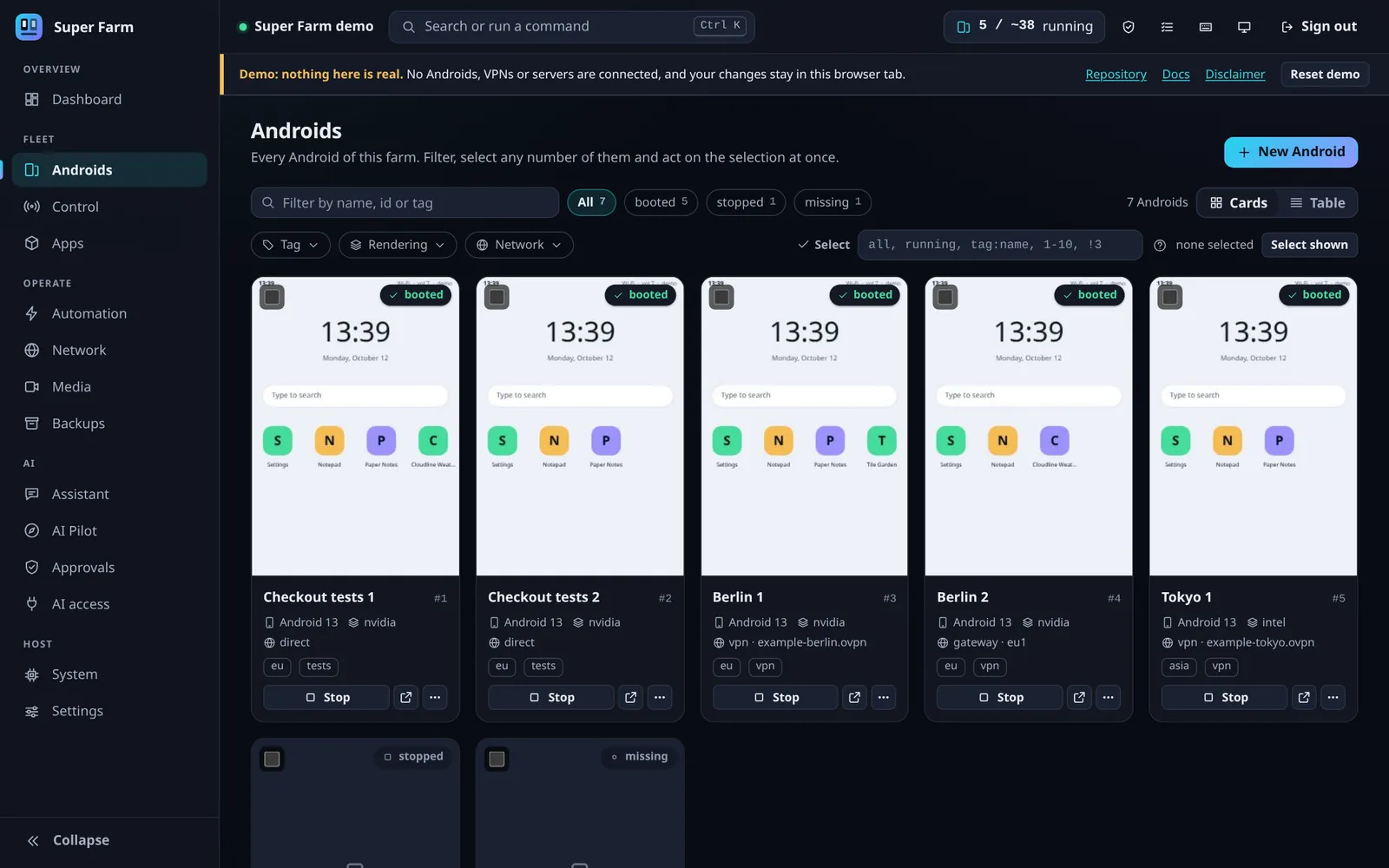
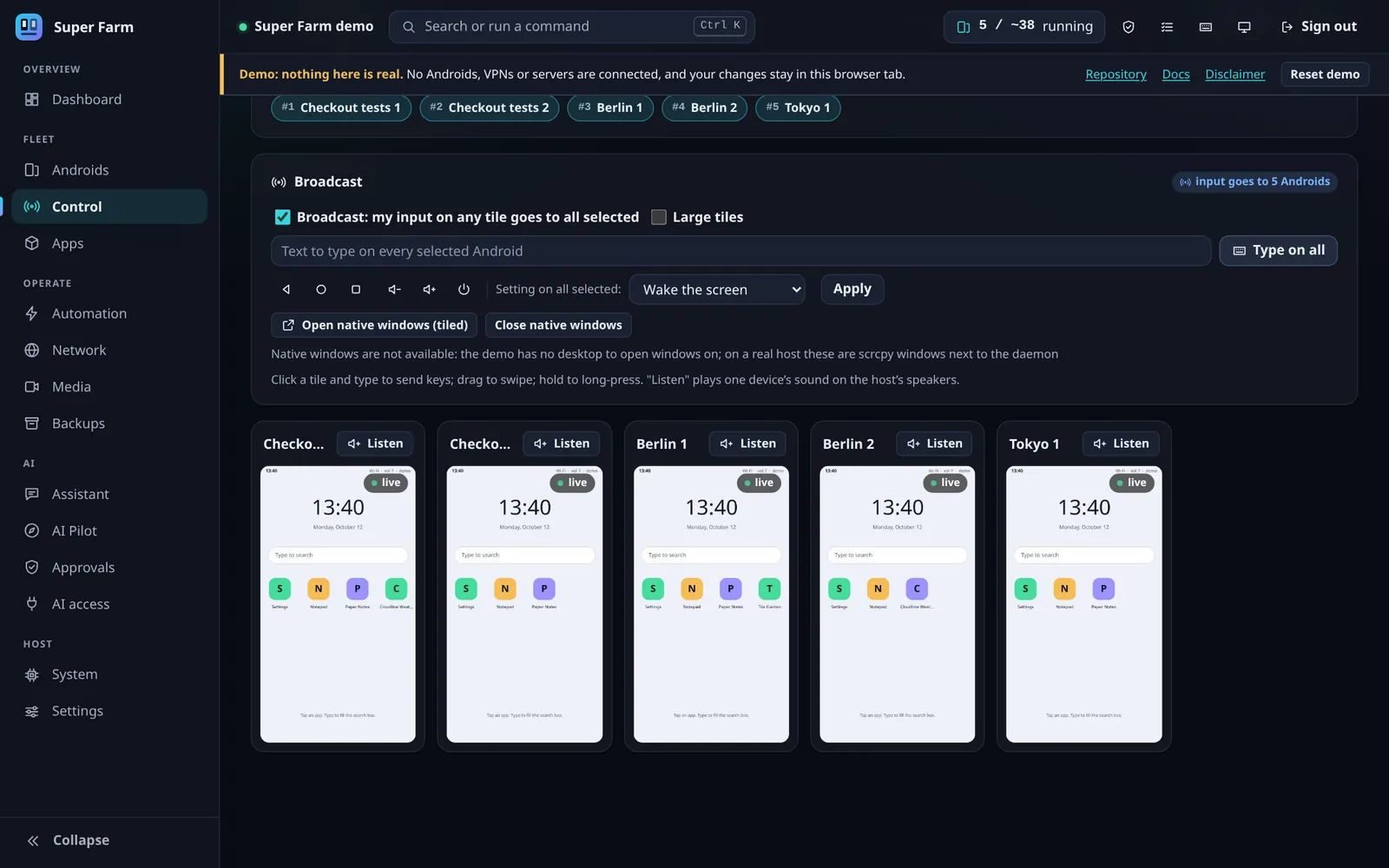
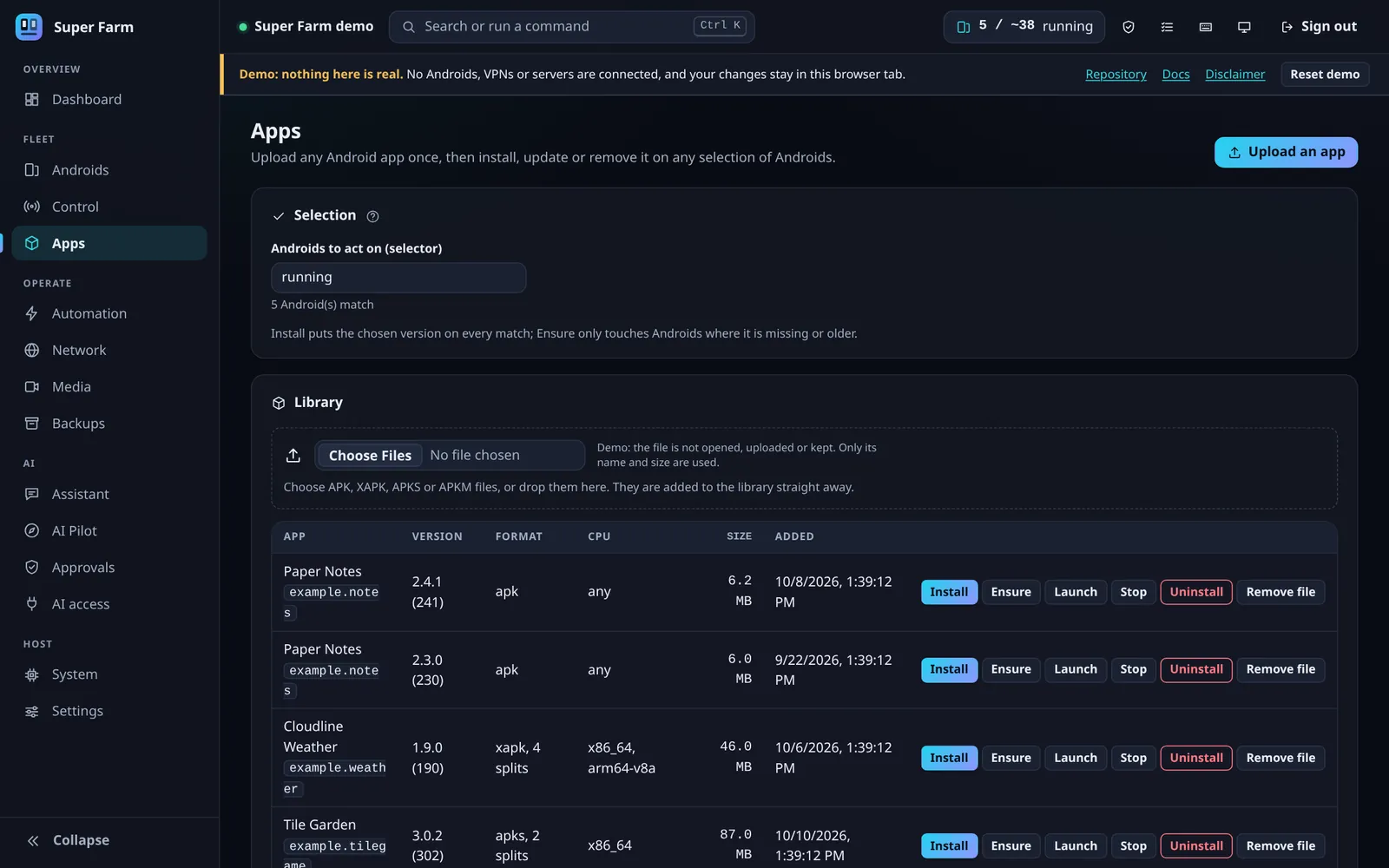
The demo is the project's own panel over a fake backend in your browser. The Androids, addresses and numbers in these pictures are invented, as the banner on every page says.
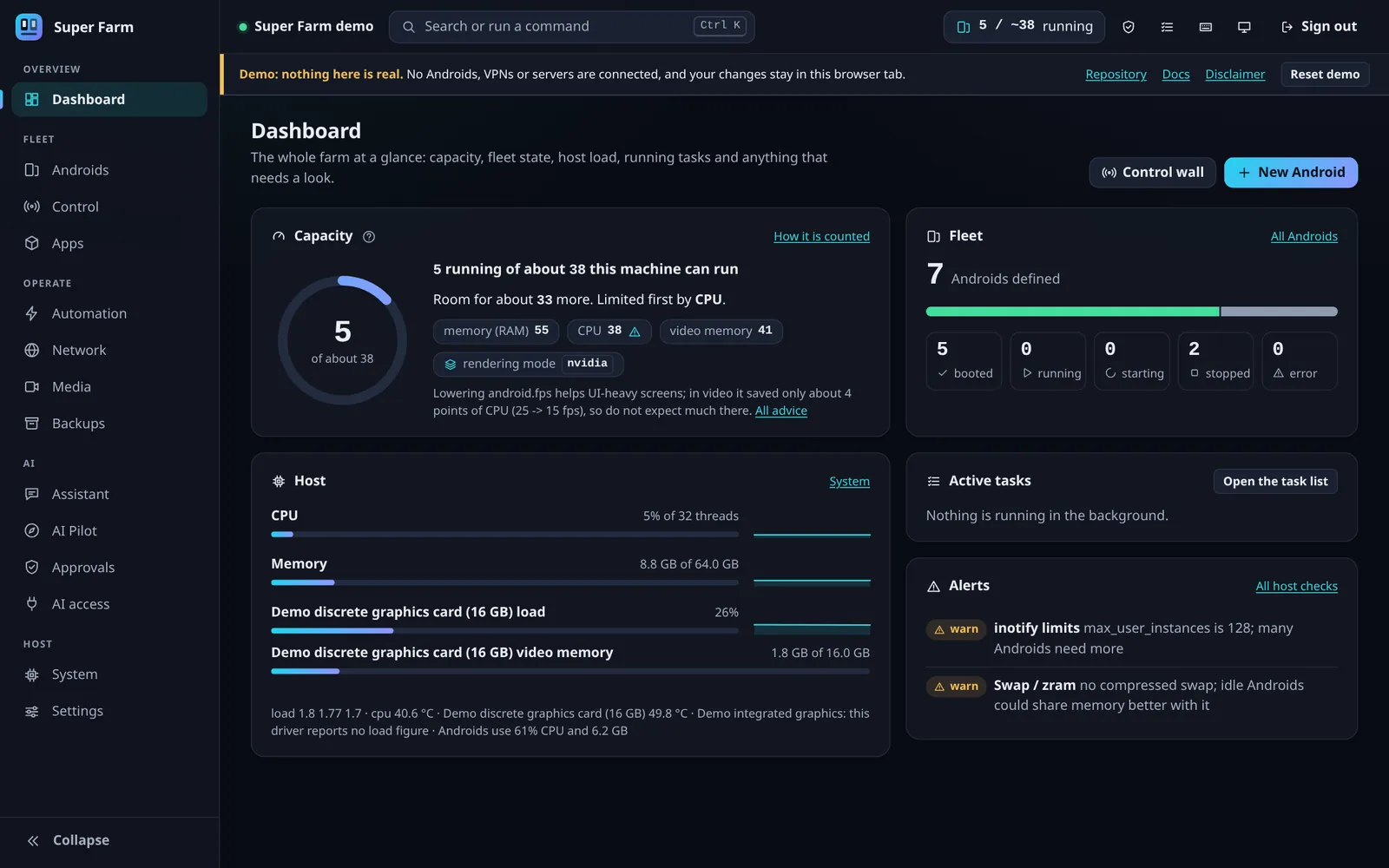 (opens the full-size screenshot in a new tab)
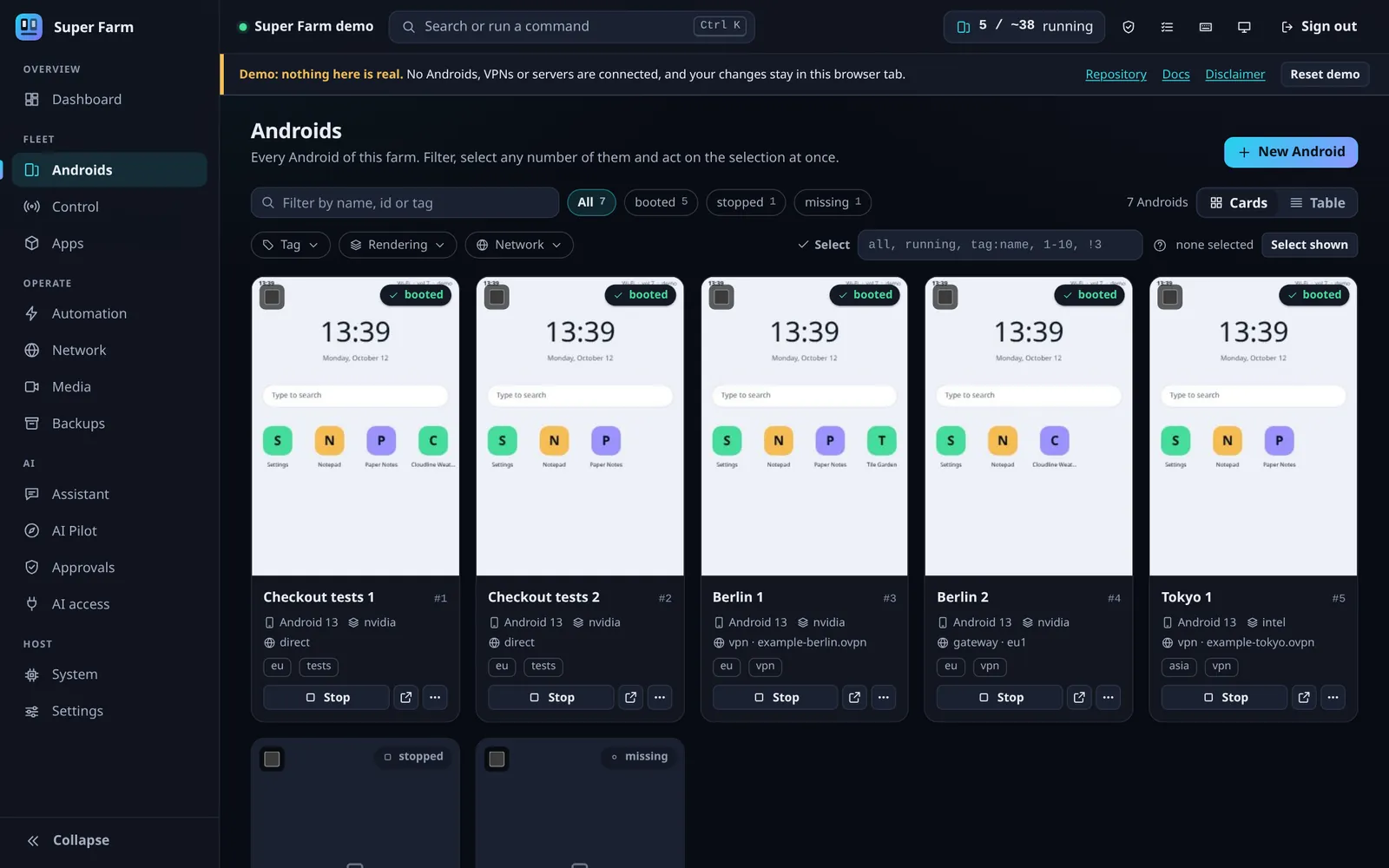 (opens the full-size screenshot in a new tab)
Androids as cards: each screen, its Android version, renderer, network mode and tags. 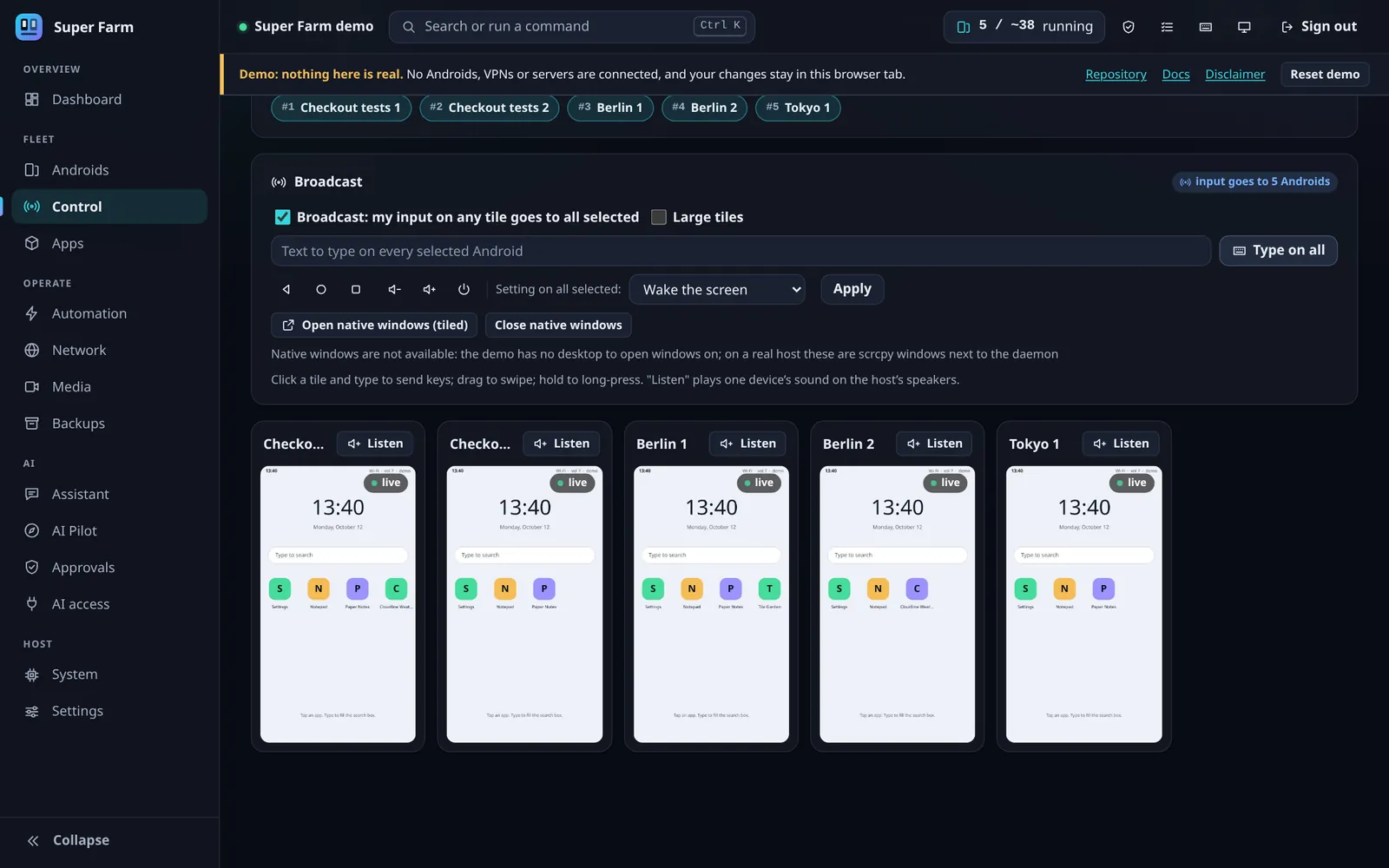 (opens the full-size screenshot in a new tab)
Control wall: five screens side by side, with broadcast on so one tap reaches all five. 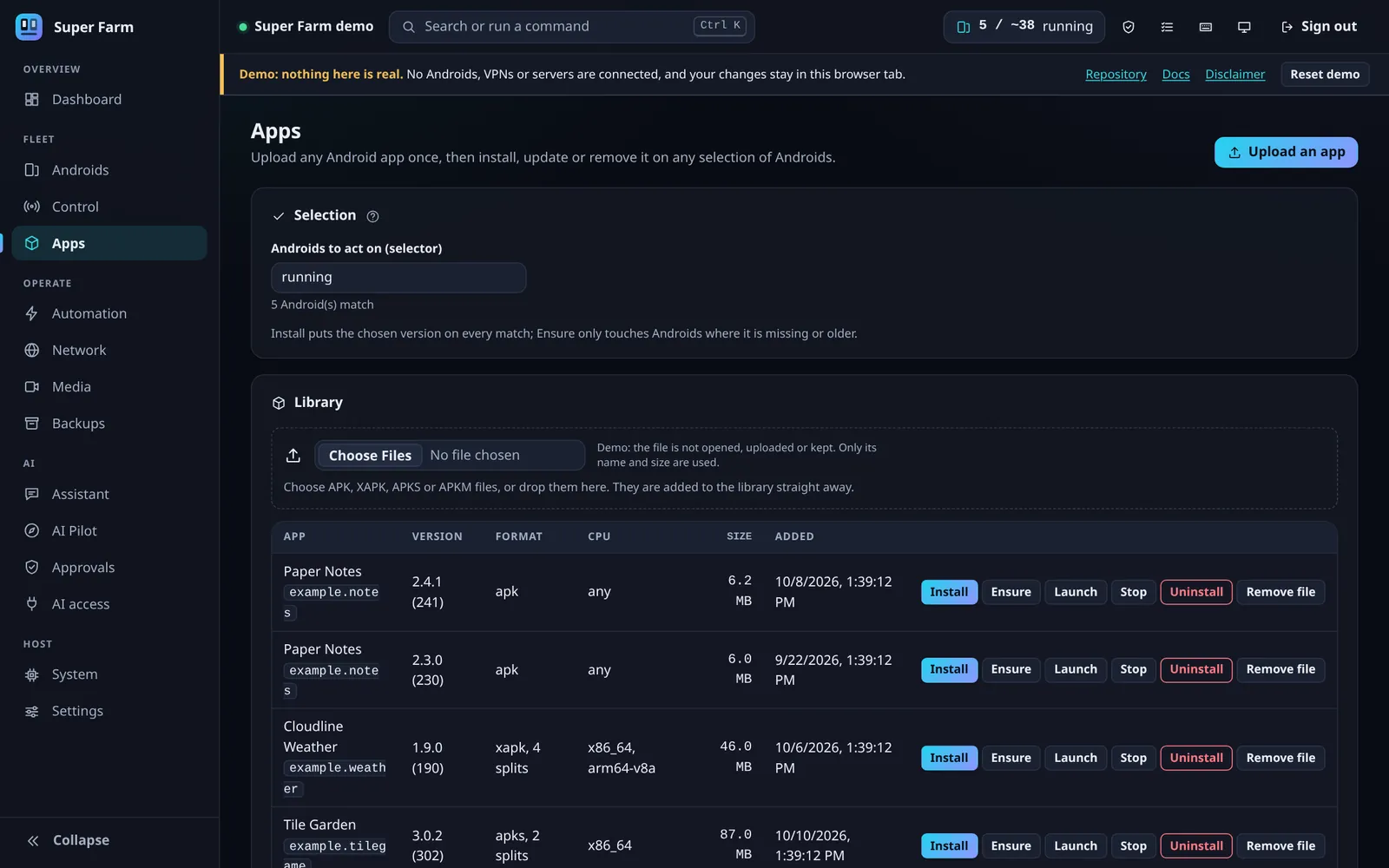 (opens the full-size screenshot in a new tab)
Apps: one library, installs across a selection, and a matrix of which version is where.
Product
Run many Android instances in Docker, each with its own settings
One selection syntax runs through the panel, the command line and the API: all, running, tag:eu or 1-10 applies an operation to as many Androids as you name.
A choice per Android
- Rendering on the CPU, the integrated GPU or a discrete GPU, by vendor, or pinned to one card.
- Images configured for Android 9 to 15, mixed in one farm. Only Android 13 has been booted in testing.
- Its own data volume, device preset and a stable identity.
Apps and bulk control
- An app library for APK, XAPK, APKS and APKM files, with a matrix of which version is on which Android.
- Install, update, launch, stop and uninstall across a selection.
- On the control wall, one tap, swipe or typed line reaches every Android you selected.
Screens, sound and camera
- Thumbnails of every Android and a live view of one, as a screenshot stream or H.264.
- sf listen 3 plays that Android's sound on the host's speakers.
- A video file or an RTMP stream can become the camera and microphone of the Androids you select.
Operations
- Backups are tar archives with a checksum manifest, restored as a new Android or over an existing one.
- sf doctor runs 46 read-only checks on the host and prints the fix for each problem.
- A capacity estimate says how many Androids the machine can run: about 33 on the test machine, limited by RAM.
Networking
A VPN or network path per Android, with a kill switch that loads first
Each Android goes out directly, through its own OpenVPN or WireGuard tunnel, through a gateway shared by many, through a proxy, or not at all.
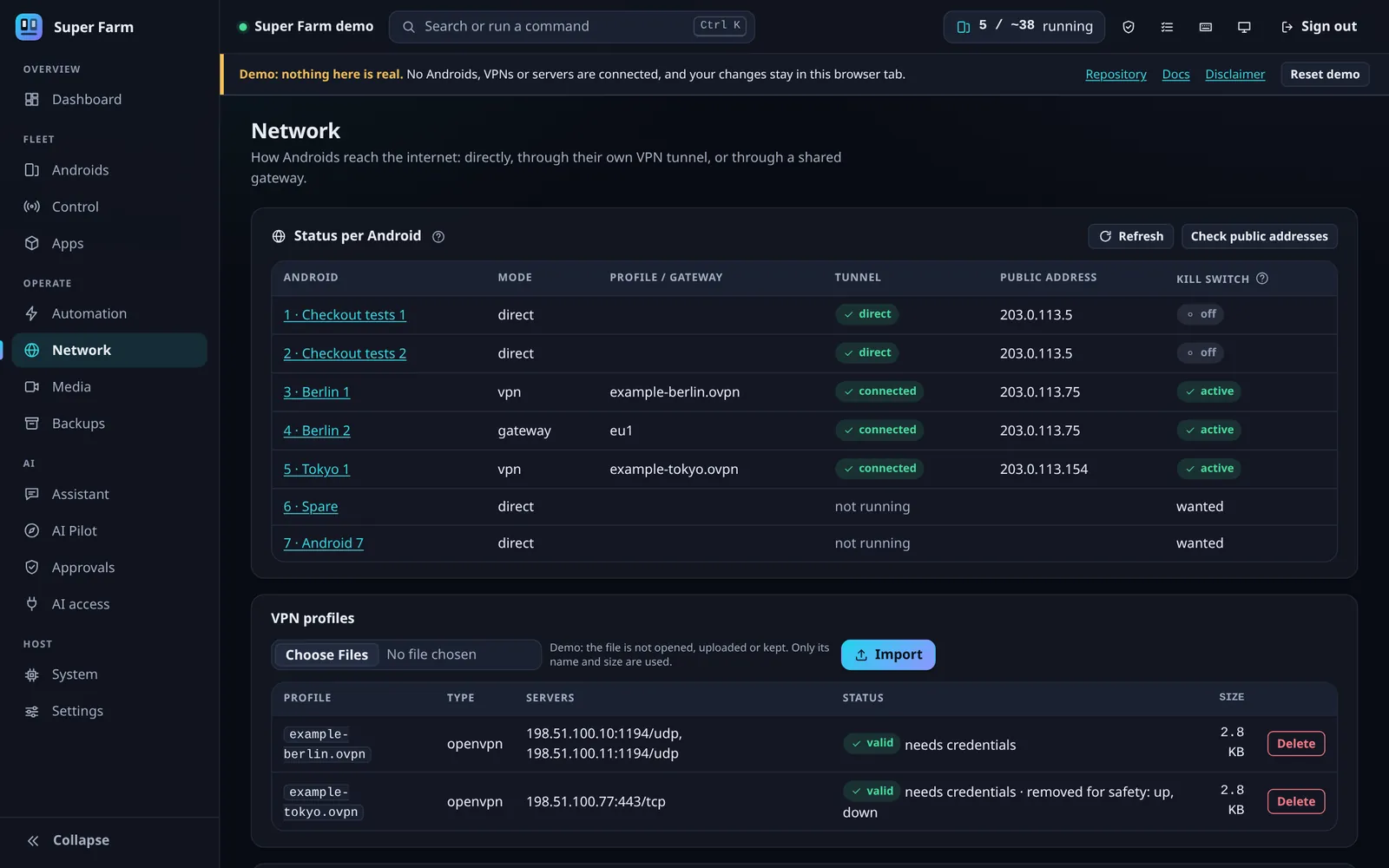 (opens the full-size screenshot in a new tab)
Why there is a sidecar
- Android's network daemon rewrites the routing of the namespace it joins, which drops a VPN's routes.
- So each Android runs in a sidecar container's namespace, and a loop there puts the routes back every 2 seconds.
The order is the security property
- The firewall denies by default, for IPv4 and IPv6, before anything else starts.
- The VPN server's addresses are pinned while only DNS is open; then DNS closes and the tunnel starts.
Checked, not assumed
- A start is not ready until the live rules are read back, and they are checked again about every 30 seconds.
- A live test proves the test: a control run with the kill switch off does leak.
Automation and AI
Android automation you record, and an AI assistant that has to ask first
You record a task on the live view a few times and training merges the recordings into one program. A built-in Assistant and any MCP client work through one registry of 39 tools: 17 that read, 17 that change and 5 that destroy.
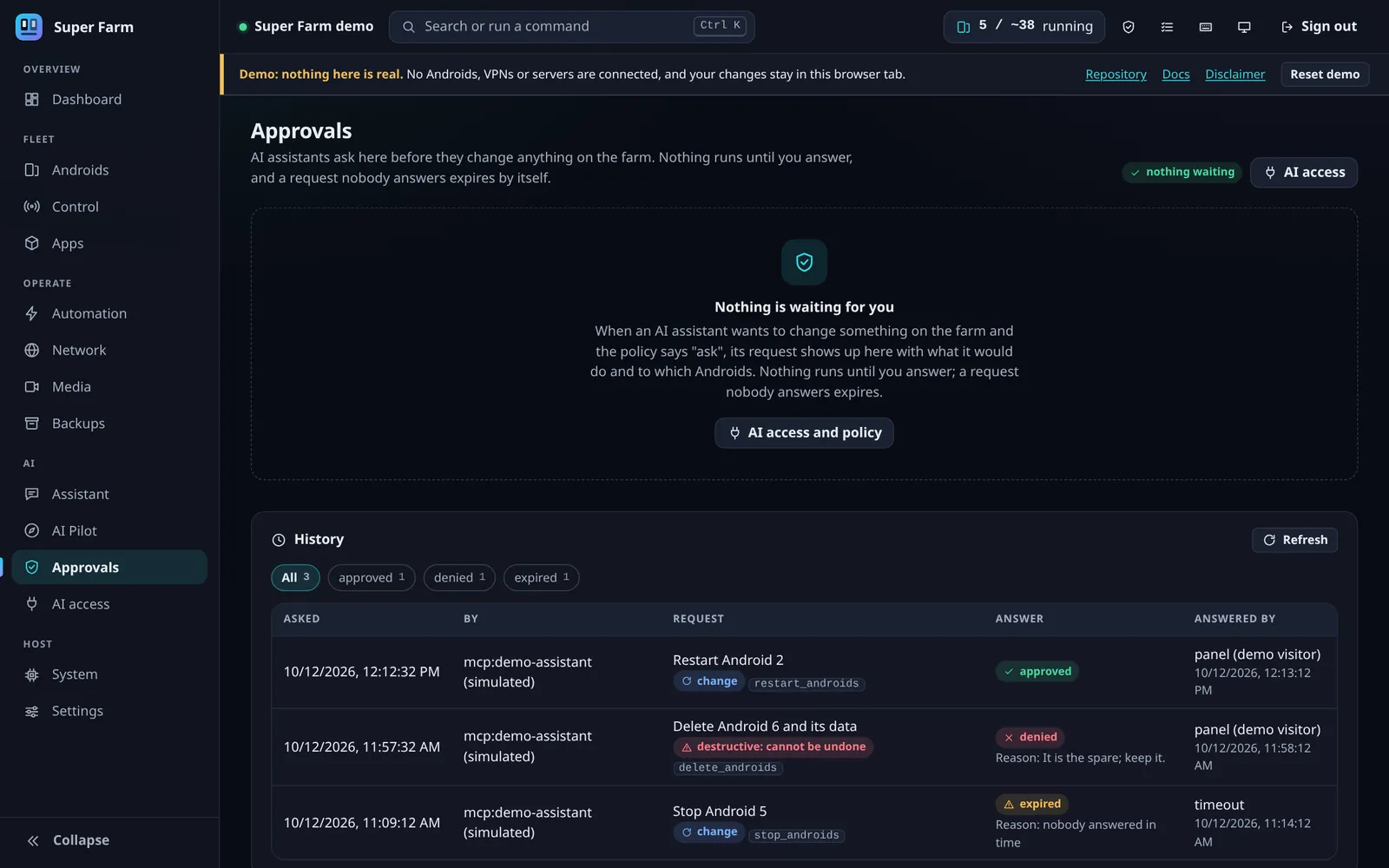 (opens the full-size screenshot in a new tab)
Training by consensus
- A step is kept when at least half the recordings made it; its element is a majority vote and its coordinates the median.
- A language model may describe the steps. It cannot add, remove or reorder them.
- The Pilot lets a model operate an app once; the verified runs become a program that replays with no model.
The default policy is ask
- Tools that read run. Tools that change or destroy wait for your Yes or No in the approvals inbox.
- A request nobody answers expires after 300 seconds and runs nothing.
- “Approve and remember” lasts for the session only and is never offered for a destructive tool.
What a model cannot do
- The line you approve is written by the daemon from validated arguments, never by the model.
- The action runs on exactly the Androids listed in it.
- Running a shell command is denied under every policy and is not listed to clients.
Evidence
What was run, and what was not
Version 0.1.0 was tested on one machine with one Android version. The project keeps a table of both lists, with the test behind every line; this is the short form.
Verified against real containers
- An Android's whole lifecycle in software, Intel and NVIDIA rendering: 10 of 10 scenarios.
- VPN tunnels, the kill switch and shared gateways, against an OpenVPN server the test creates: 14 of 14.
- Backup and restore: owners, modes and 362 extended attributes identical afterwards.
- App installs, input, live view, automation, the API and the MCP server.
- The panel in headless Chrome, and the installer on five Linux distributions.
Not verified
- Anything that needs root or a real init system: host setup for real, the boot service, module signing.
- AMD GPUs, WireGuard tunnels, IPv6 and Docker older than 29.
- Android versions other than 13.
- The virtual camera picture end to end, and browsers other than Chrome.
- More than two real Androids at once through Super Farm itself.
Measured on the test machine
- Boot in about 11 seconds with software or NVIDIA rendering, 17 on the Intel integrated GPU.
- About 0.9 to 1.1 GB of memory per Android in use.
- With 13 Androids scrolling a settings screen: 78% of a core each in software, 13% on Intel, 15% on NVIDIA.
Known limits
- The API token is equivalent to root on the host, because the Androids are privileged containers.
- Proxy mode has no kill switch, and a shared gateway holds at most 126 Androids.
- ADB has no authentication, so it is published on loopback by default.
Demo and scope
A demo with a pretend backend, and a stated purpose
The live demo is a static website: a landing page, the documentation, and the panel under /panel/.
The panel reaches its daemon through one file with four functions. The demo's build copies the panel as it is and replaces that one file with a fake that answers the same calls inside the page. Nothing you do there leaves your browser, and your changes are gone when the tab closes.
It shows how the panel behaves. It does not show that the software works on your machine, which is what the verification table is for.
Published for
- Education and research.
- App development, QA and compatibility testing.
- Operating apps you own or are authorised to test.
Not for
- Fraud, spam, fake engagement, or bulk and fake accounts.
- Evading bans or detection, or access you are not authorised to have.
- Requests for features whose only purpose is to defeat detection of automation are closed.
Growth
Skills I sharpened.
- Linux and containers
- Docker networks and namespaces, privileged containers, kernel modules, systemd user services.
- Networking
- Policy routing, default-deny firewalls, OpenVPN, shared gateways, a kill switch proven by a leak test.
- Graphics and Android
- Mesa on Intel, NVIDIA through a Venus relay, boot properties, input, backups that keep extended attributes.
- API design
- FastAPI, token and session authentication, idempotency keys, an audit log.
- AI tooling
- An MCP server, a tool registry with read, change and destructive tiers, approvals a model cannot write.
- Testing and documentation
- Unit tests against stand-ins, live tests against real containers, and a table of what was never run for real.